 Stack
The best pay-once productivity apps (2026)
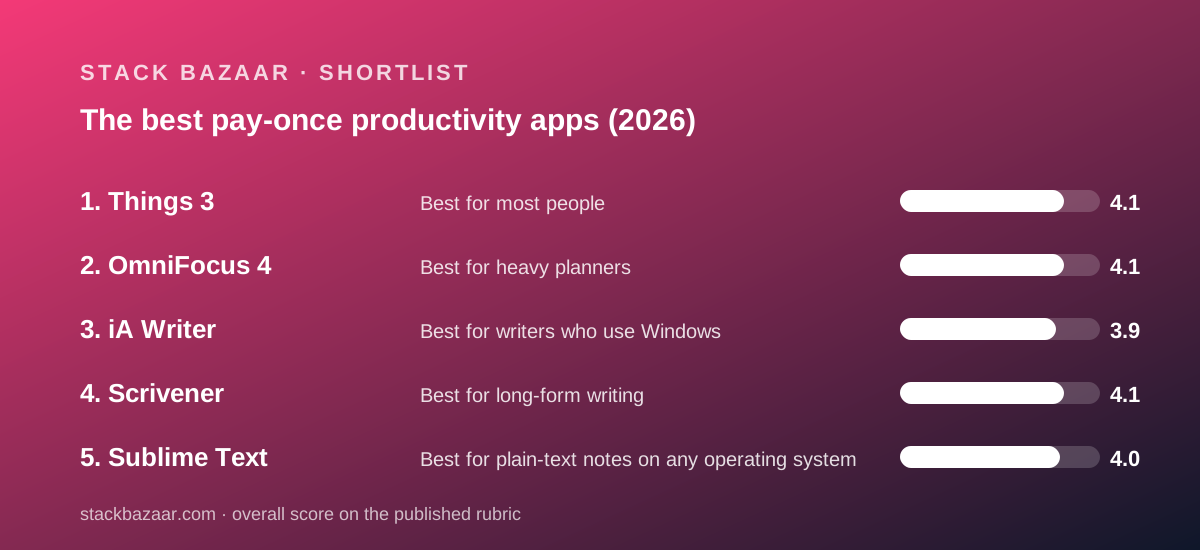
Our top pick is Things 3, because it is the simplest perpetual licence we have read: three fixed prices starting at $9.99, a vendor statement that there are no subscriptions, free sync, Family Sharing and free updates for the life of version 3. Behind it sit OmniFocus 4, iA Writer, Scrivener and Sublime Text, each a genuine one-time licence with a different catch. This guide is for anyone who wants to cross a few monthly lines off the software bill by owning the tools they plan with and write in, and it grades each licence on what the vendor's own pages promise about devices, updates, upgrades, trials and refunds, all checked in October 2026. We did not test the products ourselves; how we graded is set out below the at-a-glance list.
Our picks
- Best for most people: Things 3
- Best for heavy planners: OmniFocus 4
- Best for writers who use Windows: iA Writer
- Best for long-form writing: Scrivener
- Best for plain-text notes on any operating system: Sublime Text
Who this guide is for, and what pay-once means here
Most people's productivity software is now rented: a task manager at a few dollars a month, a notes app at a few more, a writing tool on a yearly plan. None of the lines is large. Together they are a permanent bill for tools that have not fundamentally changed in years.
This guide is for anyone who wants to buy those tools instead. Pay-once, as used on this site, means a licence an individual buys with a single payment that keeps working indefinitely, even if updates stop. It does not mean free updates forever. As how lifetime software deals actually work explains, almost every perpetual licence has a clock, and the job is to find it before paying.
The five apps below are all real one-time licences on the vendors' own terms. None is on sale. They are here because the regular price is already the deal, and because each illustrates a clause a buyer should read. Our developer and database picks are in the best pay-once software for freelancers; this guide is the planning and writing shelf.
The best pay-once productivity apps at a glance
Five picks in rank order, with the figure each vendor published when we checked.
1. Things 3, best for most people: $49.99 Mac, $9.99 iPhone and Watch, $19.99 iPad, $79.97 for all three (US App Store, October 10, 2026); no subscription; free sync; Family Sharing; 15-day Mac trial; refunds through Apple only.
2. OmniFocus 4, best for heavy planners: $74.99 Standard or $149.99 Pro, one universal licence for every Apple device (buy page, October 10, 2026); $99.99 yearly subscription sold beside it; web app $49.99 a year extra; 14-day trial on every platform; 30-day return guarantee including App Store purchases.
3. iA Writer, best for writers who use Windows: $49.99 Mac, $29.99 Windows, iOS $49.99 on the pricing page and $19.99 on the US App Store the same day (October 10, 2026); no subscription; multiple devices of the same type; 7-day desktop trial; 30-day refund on direct purchases.
4. Scrivener, best for long-form writing: $59.99 USD on the Mac App Store (October 10, 2026); household licence on one platform; minor updates free for the life of the version; 30-day trial counted in days of use; 30-day refund on the vendor's store.
5. Sublime Text, best for plain-text notes on any operating system: $99 USD personal licence (October 8, 2026); every machine where you are the primary user, Mac, Windows and Linux; three years of updates then $80 to upgrade; evaluation with no time limit; 30-day refund.
How we graded these licences
We did not run tests of our own; grades come from documentation, pricing pages and verified user reports checked on October 8 and October 10, 2026. Five questions decided the order.
What does one purchase cover? Devices, platforms and household members. A universal licence or a household clause is worth more than a per-device key at the same price. Family Sharing through Apple counts, because it is a published term.
Is a subscription sold beside the licence, and what would it cost instead? A licence is only a deal if the alternative is visible. Where a vendor prices both, we did the division and report the month at which the licence pulls ahead.
How long do updates last, and what does the next major version cost? Every licence here keeps working after its window. The difference is whether updates are promised for the life of a version, for three years, or not at all, and whether the vendor has a published record of charging half price or full price at the last transition.
Can you evaluate before you pay? A trial on every platform, a trial on one platform, a trial counted in days of use, an evaluation with no clock, or nothing but a refund window are five different answers, and this cluster has all five.
How long is the refund window, and what do verified users say? We read App Store ratings and Trustpilot where they existed; Trustpilot pages for Cultured Code and iA returned 404s and Omni's showed no reviews, so App Store averages carry most of the weight. The general method is in how to read a software deal before you pay.
Best for most people: Things 3
One tier, three fixed prices, no subscription anywhere in the offer, and a vendor page that says so in a sentence.
Price: $49.99 Mac, $9.99 iPhone with Watch, $19.99 iPad, per the US App Store on October 10, 2026; $79.97 for all three by the editors' arithmetic. Licence: one platform per purchase, unlimited devices of that kind, Family Sharing up to six. Updates: free for the life of version 3. Trial: 15 days, Mac only. Refund: Apple's rules.
Strengths first. Cultured Code's Getting Things page states that Things 3 is a one-time purchase for each platform and that there are no subscriptions. Sync through Things Cloud is free. Installing on a second Mac or iPad costs nothing. The verified picture is the strongest in the cluster: 28K ratings at 4.8 for the iPhone app and 12K at 4.9 for the iPad app on the US App Store.
Limits next. The vendor supports no Windows, Android, Linux or web client. The trial exists only on the Mac, because Apple does not allow trials for apps without in-app purchases. There is no student or business discount. And the next major version will be a new purchase at an unpublished price; Things 3 was paid for Things 2 owners.
Why it sits at #1. It is the licence with the fewest clauses and the lowest entry. A $9.99 iPhone purchase is the cheapest way in this guide to find out whether a tool will stick, and nothing is held back behind a tier. OmniFocus covers more devices for less in the all-devices case, but adds a Pro decision, a subscription and a web line that Things never asks you to think about.
Read our full Things 3 review. Deciding between the two task managers? Read Things vs OmniFocus.
Best for heavy planners: OmniFocus 4
One universal licence for every Apple device, priced on the same page as the subscription it replaces, with a return window that even covers the App Store.
Price: $74.99 Standard, $149.99 Pro, per the buy page on October 10, 2026; subscription $99.99 a year; web app $4.99 a month or $49.99 a year for licence owners. Licence: Mac, iPhone, iPad, Watch and Vision in one; household use by direct family. Updates: all 4.x. Trial: 14 days on every platform. Refund: 30 days, Omni store and Apple stores; none on subscriptions.
Strengths first. The buy page prices the licence and the subscription side by side, and by the editors' arithmetic the Standard licence is cheaper than the subscription inside a year and the Pro licence during year two. The feature list is the widest here: Review, Forecast, tags, perspectives, automation, a Watch app and a web app. The refund policy extends a 30-day return guarantee to App Store purchases, which no other vendor in the cluster does.
Limits next. Web access is not in the licence; licence owners pay $49.99 a year for it, which erodes the saving for anyone with a PC at work. Pro doubles the price for four features. The current build requires macOS 15.2 and iOS 18.2. And the US App Store average was 4.0 from 341 ratings, well below Things.
Why it sits at #2. It covers more and promises more than Things, and its published upgrade habit is cheaper: the App Store shows half-price upgrades from earlier versions. It loses the top spot on complexity and entry price. A buyer who cannot name the custom perspective they would build is paying for scope they will not use.
Read our full OmniFocus 4 review.
Best for writers who use Windows: iA Writer
The only pay-once app in this guide with a Windows build, sold once per platform with a refund window on direct purchases.
Price: $49.99 Mac, $29.99 Windows, $49.99 iPhone and iPad on the vendor's pricing page, $19.99 on the US App Store the same day (October 10, 2026). Licence: multiple devices of the same type; Family Sharing on the App Store. Updates: minor free; major may be paid; timeline uncertain. Trial: 7 days, Mac and Windows. Refund: 30 calendar days direct; Apple's rules on the App Store.
Strengths first. The pricing page states that subscriptions are not available for iPad, iPhone, Mac and Windows. Direct purchases get a 30-day refund through Stripe and a 20% education discount. Documents are plain files you keep. The iOS App Store showed 1.5K ratings at 4.6.
Limits next. A Mac, Windows and iOS set can reach $129.97, the highest total here. The vendor explicitly declines to promise an update window. The iOS price was inconsistent between the vendor's page and Apple's store on the day we checked, and the Android app could not be priced at all.
Why it sits at #3. It is the pick for anyone the top two cannot serve, which is everyone with a Windows machine. It sits below them because the full set costs more and because the update policy is the weakest written commitment in the guide. Scrivener, one place below, promises more about updates but is the wrong tool for short pieces and has no single Mac-and-Windows licence.
Read our full iA Writer review.
Best for long-form writing: Scrivener
The most generous licence scope in the magazine, on one platform at a time.
Price: $59.99 USD on the US Mac App Store, October 10, 2026; the vendor's store shows a localised figure per platform and a Mac-and-Windows bundle. Licence: household, one platform. Updates: every 3.x release free. Trial: 30 days of actual use. Refund: 30 days on the vendor's store.
Strengths first. One purchase covers every computer you own on that platform and your family's machines in the same house. The trial counts only the days you open the app. The vendor's record at the last major version was free for recent buyers and 45% off for older ones.
Limits next. Mac and Windows are two licences or a bundle. The next major version is paid. The vendor's own store did not show a USD price on our visit. And the Trustpilot sample was 23 reviews with none in the past year.
Why it sits at #4. It would rank higher in a writing-only guide, and it tops the best pay-once software for freelancers. Here it sits below iA Writer because the per-platform rule bites harder for a general productivity buyer and because the product is built for manuscripts rather than daily notes and short drafts.
Read our full Scrivener review. Choosing between the two writing tools? Scrivener vs Final Draft covers the screenwriting case.
Best for plain-text notes on any operating system: Sublime Text
One key on every machine you use, on Mac, Windows and Linux, with a three-year update clock stated in writing.
Price: $99 USD personal licence, checked October 8, 2026. Licence: every computer where you are the primary user, all platforms. Updates: three years, then $80 to upgrade or keep the last build. Trial: evaluation with no time limit. Refund: 30 days.
Strengths first. It is the only licence here that is cross-platform on a single key, and the only one whose evaluation never expires. The update window and the renewal price are both published, which is more than iA offers.
Limits next. It is a code editor, so Markdown preview, word counts and document management need plug-ins. The three-year clock is shorter than Scrivener's life-of-version promise. And $99 is the highest single price in the guide.
Why it sits at #5. For a developer it is the best licence on this page. For a general productivity buyer it is the one that needs the most setup to do the job the four above do out of the box, and that is what holds it to last place in a guide about planning and writing.
Read our full Sublime Text review.
Also compared, and why they are not ranked here
TablePlus. A genuine one-time licence at $99 per device with one year of updates and a 7-day refund window, per our October 10, 2026 reading. It is a database client, not a productivity tool, and sits in the freelancer guide instead. Our TablePlus review has the terms.
Final Draft 13. A two-computer perpetual licence at $199.99, shown against $249.99, with a subscription sold beside it and a five-day trial that converts automatically. It is screenwriting software for people who must deliver .fdx files, and that narrow brief keeps it off a general list. Our Final Draft review has the detail.
Subscription-only task and notes apps. Several well-known tools in this category have no perpetual licence at all and were excluded on that ground alone. We will add any that introduce one and publish the terms.
How to choose a pay-once productivity app
Start with your platforms, not your features. If a Windows machine is in your week, only iA Writer and Sublime Text qualify, and OmniFocus only through its paid web app. If you are all Apple, every pick is open to you.
Count the devices and read the scope clause. Things charges per platform and covers unlimited devices of that kind. OmniFocus charges once for five platforms. Scrivener covers a household on one platform. iA covers multiple devices of the same type. The right answer depends on what is on your desk, and what happens after you pay once explains why the clause outlives the price.
Find the subscription the licence replaces and divide. Only OmniFocus prices both on one page. For the others, the comparison is against whatever rented tool you would use instead, and the break-even is usually under two years.
Buy the smallest unit that proves the habit. Things's $9.99 iPhone app, OmniFocus Standard before Pro, iA on the desktop before the phone. Every vendor here lets you add later; none lets you un-buy after the refund window.
Buy direct where the vendor's terms are better than Apple's. iA's 30-day refund and education discount, Scrivener's household licence and refund window, and Omni's educational store all apply only to direct purchases. Things has no direct store, so its terms are Apple's by design.
Frequently asked
Which pay-once task manager is cheapest? Things 3 at $9.99 for the iPhone app, per the US App Store on October 10, 2026. For Mac, iPhone and iPad together, OmniFocus Standard at $74.99 is $4.98 less than the $79.97 Things set.
Do any of these have a subscription? OmniFocus sells a $99.99 yearly subscription beside its licence; Final Draft sells one too. Things, iA Writer, Scrivener and Sublime Text sell no subscription on the platforms covered here, per their pages read in October 2026.
Which has the longest trial? Sublime Text's evaluation has no time limit. Scrivener's 30 days count only days of use. Things gives 15 calendar days on the Mac, OmniFocus 14 on every platform, iA Writer 7 on desktop.
Which has the best refund terms? OmniFocus: a 30-day return guarantee on standalone licences from the Omni store and from Apple's stores. Scrivener, iA Writer and Sublime Text offer 30 days on their own stores. Things refunds only through Apple.
Will I have to pay for the next major version? Yes, for all five. OmniFocus's App Store listing shows half-price upgrades; Scrivener's last upgrade was free or 45% off; Sublime Text publishes $80; Things and iA Writer publish no figure.
Bottom line
If you want one answer: buy Things 3 for the iPhone at $9.99, run it for a month, and add the Mac app if you are still opening it. That is the cheapest honest test of a pay-once tool in this guide.
If you plan heavily, run OmniFocus's 14-day trial and buy Standard. If you write on Windows, take iA Writer's 7-day desktop trial and buy direct. If you write books, Scrivener. If your notes are code, Sublime Text.
Every figure above was read on October 8 and October 10, 2026 and will be rechecked; the date at the top of this page is the one to trust.
Best for most people: Things 3
Three fixed prices, $49.99 Mac, $9.99 iPhone and Watch, $19.99 iPad, and a vendor statement that there are no subscriptions. Sync through Things Cloud is free, Family Sharing covers up to six, and a second device of the same kind costs nothing. The 15-day trial is Mac only and refunds run through Apple. Apple-only, one tier, and the next major version will be a new purchase at an unpublished price. US App Store ratings of 4.8 from 28K and 4.9 from 12K are the strongest verified picture in the cluster (all figures October 10, 2026).
The fewest clauses and the lowest entry price in the guide; nothing is held back behind a tier or a web add-on.
Visit Things 3
We have no affiliate relationship with this vendor. Link goes to the official site.
Best for heavy planners: OmniFocus 4
One universal licence, $74.99 Standard or $149.99 Pro, covering Mac, iPhone, iPad, Watch and Vision with all 4.x updates, priced on the same page as a $99.99 yearly subscription that the licence undercuts within a year by the editors' arithmetic. A 14-day fully functional trial on every platform and a 30-day return guarantee that covers App Store purchases. Web access is a separate $49.99 a year, Pro doubles the price for four features, and the US App Store average was 4.0 from 341 ratings (buy page and App Store, October 10, 2026).
Covers more devices and features than Things with a published half-price upgrade habit, but adds a Pro decision, a subscription and a web line.
Visit OmniFocus 4
We have no affiliate relationship with this vendor. Link goes to the official site.
Best for writers who use Windows: iA Writer
The only pay-once app here with a Windows build: $29.99 Windows, $49.99 Mac, and an iOS app the vendor priced at $49.99 while the US App Store showed $19.99 the same day. No subscription on those platforms, multiple devices of the same type on one purchase, a 7-day desktop trial, a 30-calendar-day refund on direct purchases and a 20% education discount. Minor updates are free but the vendor says major updates may be paid and the timeline is uncertain. The iOS App Store showed 1.5K ratings at 4.6 (pricing page and App Store, October 10, 2026).
The pick for anyone with a Windows machine; held below the top two by the highest full-set total and the weakest written update promise.
Visit iA Writer
We have no affiliate relationship with this vendor. Link goes to the official site.
Best for long-form writing: Scrivener
A household licence on one platform: every computer you own and your family's machines in the same house, with every 3.x update free and a 30-day trial counted in days of use. $59.99 on the US Mac App Store; the vendor's store localises its price and sells a Mac-and-Windows bundle as two licences. Refunds are 30 days on the vendor's store. The last major upgrade was free for recent buyers and 45% off for older ones. Built for manuscripts rather than daily notes, and Mac and Windows are separate purchases (vendor pages and App Store, October 10, 2026).
The most generous scope clause in the magazine, placed fourth here because the per-platform rule and the manuscript focus matter more to a general productivity buyer.
Visit Scrivener
We have no affiliate relationship with this vendor. Link goes to the official site.
Best for plain-text notes on any operating system: Sublime Text
A $99 personal licence that covers every machine where you are the primary user, on Mac, Windows and Linux, with three years of updates stated in writing and $80 to upgrade afterwards. The evaluation has no time limit and refunds are 30 days. It is a code editor, so document management and Markdown preview need plug-ins, the three-year clock is shorter than Scrivener's life-of-version promise, and $99 is the highest single price in this guide (vendor pages, October 8, 2026).
The best cross-platform key on the page, last in a planning-and-writing guide because it needs the most setup to do what the others do out of the box.
Visit Sublime Text
We have no affiliate relationship with this vendor. Link goes to the official site.
How we chose
We did not run tests of our own; grades come from documentation, pricing pages and verified user reports checked on October 8 and October 10, 2026. Each product had to be sold as a one-time licence for individuals, with the licence continuing to work after any update window ends, and had to be a tool for planning, writing or note-keeping rather than a developer or data utility. We read what one purchase covers, how long updates last and what the next major version costs, whether a subscription is sold beside the licence and what it would cost instead, the trial and refund terms, and the verified-rating picture where one could be reached. Commission plays no part: none of these five carries an affiliate link on this site as of publication.
Frequently asked
Which pay-once task manager is cheapest?
Things 3 at $9.99 for the iPhone app, per the US App Store on October 10, 2026. For Mac, iPhone and iPad together, OmniFocus Standard at $74.99 is $4.98 less than the $79.97 Things set by the editors' arithmetic. OmniFocus Pro is $149.99.
Do any of these apps have a subscription?
OmniFocus sells a $99.99 yearly subscription beside its licence, and the licence is cheaper within a year by the editors' arithmetic. Things, iA Writer, Scrivener and Sublime Text sell no subscription on the platforms covered here, per their pages read in October 2026.
Which pay-once productivity app has the longest free trial?
Sublime Text's evaluation has no time limit. Scrivener gives 30 days counted only on days you open it. Things gives 15 calendar days on the Mac, OmniFocus 14 days on every platform, and iA Writer 7 days on Mac and Windows (vendor pages, October 2026).
Which has the best refund policy?
OmniFocus, with a 30-day return guarantee on standalone licences bought from the Omni store or from Apple's stores, per its refund policy checked October 10, 2026. Scrivener, iA Writer and Sublime Text give 30 days on their own stores. Things is sold only through Apple and refunds are Apple's decision.
Will I have to pay again for the next major version?
Yes, for all five. OmniFocus's App Store listing shows half-price upgrades from earlier versions; Scrivener's last upgrade was free for recent buyers and 45% off for older ones; Sublime Text publishes an $80 upgrade; Things and iA Writer publish no figure (vendor pages, October 2026).
Can I use any of these on Windows?
iA Writer at $29.99 and Sublime Text within its $99 cross-platform licence have native Windows builds. Scrivener sells a separate Windows licence. OmniFocus reaches Windows only through its web app at $49.99 a year. Things has no Windows, Android or web version (vendor pages, October 2026).