 Stack

Things 3
A to-do app sold as a one-time purchase per Apple platform, with free sync, Family Sharing and a 15-day Mac trial
Scored on the published rubric, from documentation, pricing and verified user reports.
Best for: An Apple-only worker who wants a personal task manager bought once per device type, synced for free, and never upsold to a subscription.
Verdict
This is a documentation review. It rests on Cultured Code's support pages titled Getting Things and Trying the App, on its pricing page, and on the three US App Store listings, all read on October 10, 2026. Nobody here has graded the app in use.
On those pages Things 3 is the cleanest pay-once offer in this cluster. The vendor states in plain words that Things 3 is a one-time purchase for each platform and that there are no subscriptions. Sync through Things Cloud is free. Family Sharing is supported. Installing on a second device of the same kind costs nothing.
The price is split three ways: $49.99 for Mac, $9.99 for iPhone and Watch, $19.99 for iPad. A full set is $79.97 by the editors' arithmetic, which is less than a year of most task-manager subscriptions.
The limits are also printed. There is no Windows, Android or web version. Only the Mac has a trial, 15 days from first launch. The next major version, when it comes, will be a new purchase, and the vendor does not say when or at what price.
Visit Things 3
We have no affiliate relationship with this vendor. Link goes to the official site.
Where it is strong
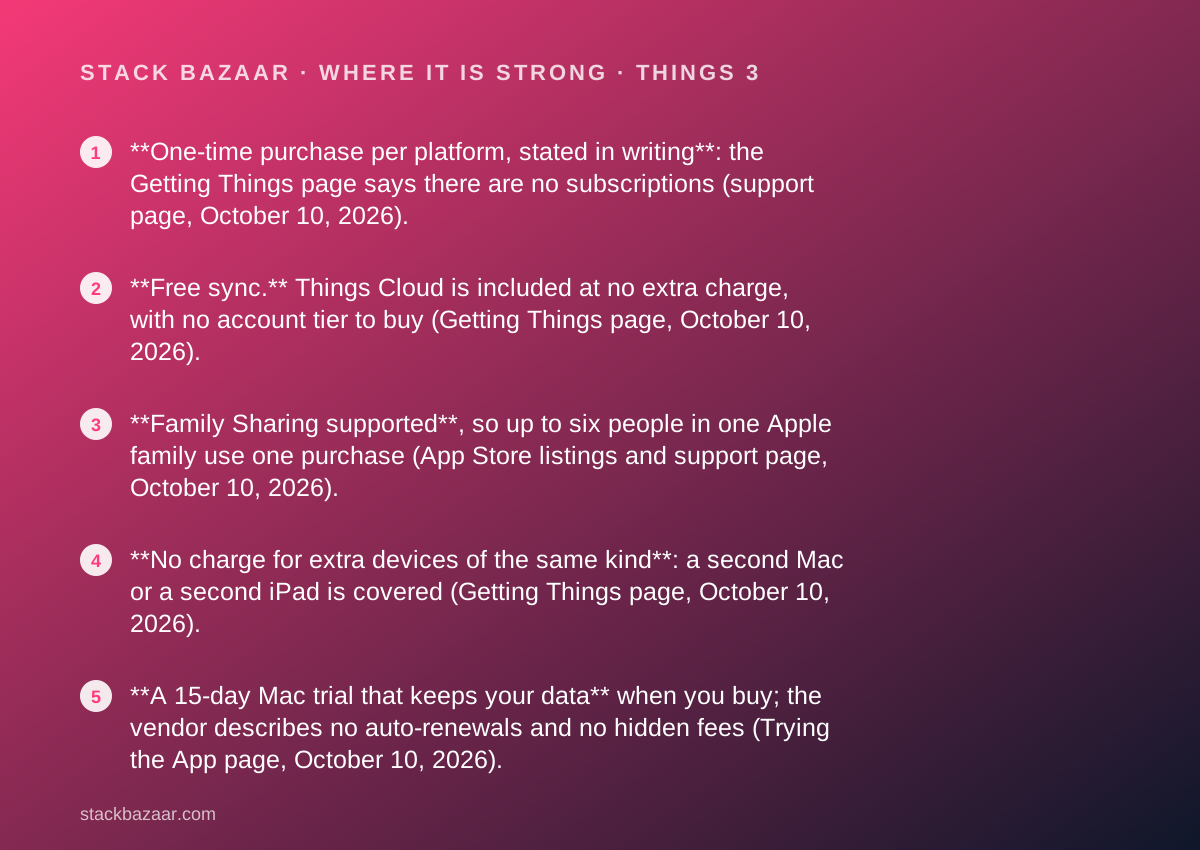
- **One-time purchase per platform, stated in writing**: the Getting Things page says there are no subscriptions (support page, October 10, 2026).
- **Free sync.** Things Cloud is included at no extra charge, with no account tier to buy (Getting Things page, October 10, 2026).
- **Family Sharing supported**, so up to six people in one Apple family use one purchase (App Store listings and support page, October 10, 2026).
- **No charge for extra devices of the same kind**: a second Mac or a second iPad is covered (Getting Things page, October 10, 2026).
- **A 15-day Mac trial that keeps your data** when you buy; the vendor describes no auto-renewals and no hidden fees (Trying the App page, October 10, 2026).
- **Strong verified ratings on iPhone and iPad**: 28K ratings at 4.8 and 12K at 4.9 on the US App Store (October 10, 2026).
Where it falls short
- **Apple only.** The vendor states that Windows, Android, Linux and web browsers are not supported (Getting Things page, October 10, 2026).
- **Three purchases for three device types.** Mac, iPhone and iPad are sold separately, $79.97 in total by the editors' arithmetic (App Store listings, October 10, 2026).
- **No trial on iPhone, iPad or Vision**, because Apple allows trials only for apps with in-app purchases or subscriptions (Trying the App page, October 10, 2026).
- **No student or business discount**, and no sale pricing; the vendor points to Apple's education and volume programmes instead (Getting Things page, October 10, 2026).
- **The next major version is a new purchase** at a price and date the vendor does not publish; Things 2 owners paid again for Things 3.
At a glance
| Starting price | $9.99 one-time (iPhone and Watch); $49.99 Mac; $19.99 iPad (US App Store, October 10, 2026) |
|---|---|
| Pricing note | $49.99 for Mac, $9.99 for iPhone with the Watch app included, $19.99 for iPad, each a separate one-time App Store purchase; $79.97 for all three by the editors' arithmetic (US App Store listings, checked October 10, 2026) |
| Full set | $79.97 for Mac, iPhone and iPad by the editors' arithmetic; Vision Pro price not read |
| Licence scope | One-time purchase per platform; no charge for additional devices of the same kind; Family Sharing supported |
| Platforms | macOS 13.3+ (3.24.1), iOS 16.4+ with watchOS 9.1+ (3.24.2), iPadOS 16.4+ (3.24.2), visionOS; no Windows, Android or web |
| Sync | Things Cloud, free, no extra charge |
| Trial | 15 days from first launch, Mac only |
| Refund window | Handled by Apple; the vendor cannot issue refunds |
| Discounts | None; vendor refers students and businesses to Apple programmes |
| Update policy | Free updates within version 3; major versions are new purchases, price not published |
| Seller of record | Apple (App Store only) |
Why a $49.99 app with no sale is in a deals magazine
Things 3 is not discounted and never has been on the pages we read. It is here because its purchase terms are the opposite of the subscription creep this magazine exists to price out.
The vendor's support page says it in one sentence: Things 3 is a one-time purchase for each platform; there are no subscriptions. Sync is free. Family Sharing works. That is the whole licence, and it fits on an index card.
It opens our pay-once productivity cluster alongside OmniFocus 4 and iA Writer, and it sits next to the writing and developer tools in the best pay-once software for freelancers. The questions we put to every licence are the ones in how lifetime software deals actually work: what one purchase covers, how long updates last, what the next version costs, and how you can evaluate first.
Everything below comes from Cultured Code's pages and the US App Store on October 10, 2026. None of it describes what managing a week in the app is like.
What Things 3 is
Things 3 is a personal task manager for Apple devices, made by Cultured Code GmbH & Co. KG in Stuttgart. The App Store listings on October 10, 2026 show version 3.24.1 for Mac, requiring macOS 13.3 or later, and version 3.24.2 for iPhone and iPad, requiring iOS or iPadOS 16.4 or later.
The iPhone purchase includes the Apple Watch app, which requires watchOS 9.1 or later. A Vision Pro version is listed on the vendor's site; its price was not read for this review.
The shape matters for a pay-once buyer. Things is a local app with an optional free sync service, not a hosted product behind a login. The vendor's Syncing Your To-Dos article describes creating a Things Cloud account, and the Getting Things page states sync is available at no extra charge. That is the right shape for a licence you intend to keep, for the reasons in what happens after you pay once.
What one purchase covers, as of October 2026
The Getting Things page, read October 10, 2026, answers the coverage questions directly, which is rarer than it should be.
- Things is sold separately for Mac, iPad, iPhone and Vision; the Watch app comes with the iPhone app.
- There is no extra charge when installing Things on other devices of the same kind, so two Macs need one Mac purchase.
- Apple's Family Sharing is supported, so the app can be shared with family members at no extra cost; each App Store listing says up to six family members.
- Things Cloud sync between devices is included at no extra charge.
- Windows, Android, Linux, web browsers and other non-Apple devices are not supported.
How the pricing is structured
Three prices, three stores, one seller of record.
On the US App Store on October 10, 2026, Things 3 for Mac is $49.99, Things 3 for iPhone is $9.99, and Things 3 for iPad is $19.99. By the editors' arithmetic a full Mac, iPhone and iPad set is $79.97. The vendor's pricing page explains that it sets a price in US dollars and Apple converts it for each country, so readers outside the United States should check their own store.
There is no bundle. The Getting Things page states plainly that Apple's App Store does not offer discounts for apps sold this way and that the vendor cannot offer student or business pricing. Students are pointed to Apple's Education programme and companies to Volume Purchase.
Set against the rest of the cluster: OmniFocus 4 Standard is a single $74.99 universal purchase covering every Apple device; Things reaches a similar total only if you buy all three apps. Sublime Text is $99 for every machine you use, on any operating system. The comparison with OmniFocus is worked through in Things vs OmniFocus.
Who it is best for
The licence shape, not the feature list, decides who this suits.
- A freelancer or office worker whose Mac, iPhone and iPad are all Apple and who wants one task list across them with no monthly line.
- A household where more than one person keeps a to-do list, since Family Sharing extends one set of purchases to six people.
- Someone who already pays for one too many subscriptions and would rather spend $79.97 once than $4 to $8 a month indefinitely.
- An iPhone-first user who can start at $9.99 and add the Mac app later if the habit sticks.
- A buyer who wants a trial that keeps their data: the Mac trial is 15 days and the vendor says purchases pick up where the trial left off.
Who should skip it
Three groups should read the platform list twice before paying.
- Anyone who touches Windows, Android or a web browser during the working day; there is no client for any of them and no web app.
- Teams. Things has no shared projects, assignment or team plan on the vendor's feature pages; it is personal software.
- Buyers who want a trial on the device they will mainly use, if that device is an iPhone or iPad; the trial exists only on the Mac.
The trial: 15 days on the Mac, nothing elsewhere
The Trying the App page, read October 10, 2026, is unusually specific about what the trial is and is not.
The Mac trial runs for 15 days from first launch and is downloaded from the vendor's site rather than the App Store. When it expires, whatever you entered is stored safely on the Mac and is picked up when you extend the trial or buy. Anything added after expiry is not saved and sync is disabled. If you decide against buying, you delete the app, with what the vendor calls no auto-renewals or hidden fees.
There is no trial on iPhone, iPad or Vision. The vendor explains why: Apple provides trials only for apps with in-app purchases or subscriptions, and Things is a one-time up-front purchase at the time of download. The practical order is to trial on the Mac, buy there, and then buy the $9.99 iPhone app with the risk already retired.
That sequence is the same one described in how to read a software deal before you pay: evaluate first, pay second, and pay the smallest amount that proves the habit.
Refunds and the App Store: what you give up
Things is sold only through Apple, and that has two consequences the vendor spells out.
First, refunds. The vendor cannot issue them; you have to ask Apple. The Troubleshooting App Store Issues page adds that once Apple refunds you, you no longer own the app and are not eligible to receive updates. There is no vendor-side 30-day window of the kind Scrivener offers on its own store.
Second, account binding. The same page notes that updates fail if you bought Things with a different Apple account from the one you are using, and that Family Sharing members may see a no longer shared error if the sharing arrangement changes. These are Apple's mechanics, not Cultured Code's, but they are the mechanics you will live under.
Update policy and the next major version
A pay-once licence is a bet on the vendor's behaviour at the next major version, so the record matters.
Within version 3 every update has been free; the App Store listings show 3.24.1 and 3.24.2 as the current builds in late September 2026, several years after version 3 launched. The vendor does not publish a schedule or price for a Things 4.
The record from the last transition is that Things 3 was a new purchase for Things 2 owners. The Getting Things page links to a migration guide for moving to-dos from Things 2 to Things 3 but states no upgrade price, and the vendor's no-discounts policy applied then as now. A buyer should assume the next major version is a full-price purchase on each platform, and should weigh that against the years of free 3.x updates already delivered.
Value: what the score is built from
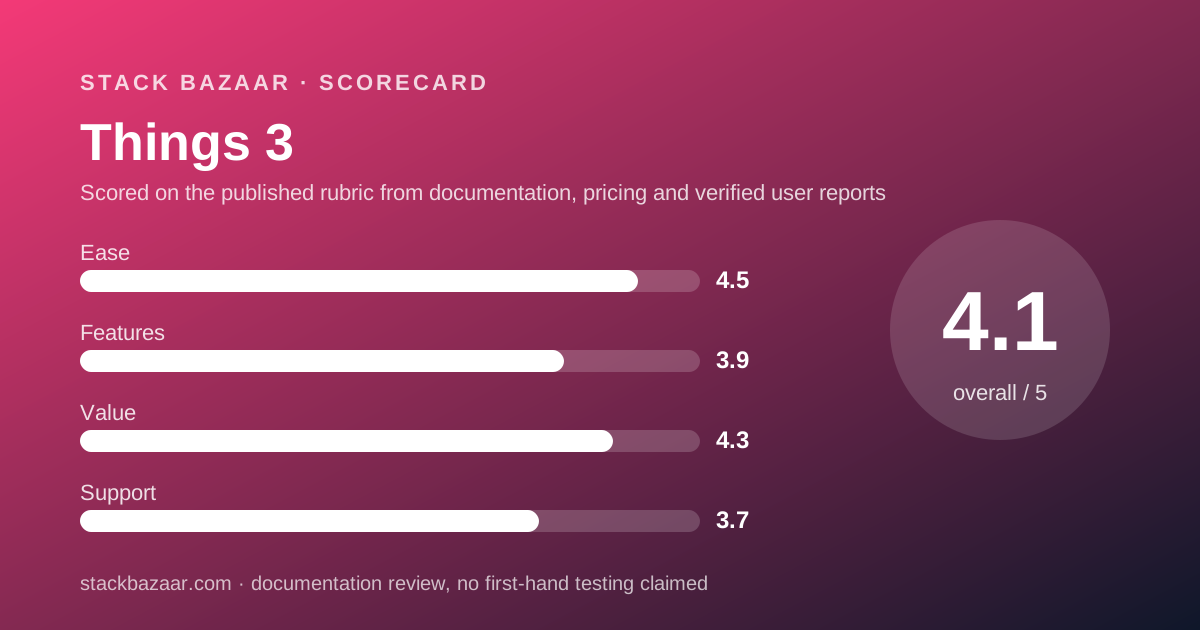
A 4.3, built from scope and candour rather than from a low sticker.
The case for the score is simple arithmetic. A full set is $79.97 once. The subscription task managers it competes with charge by the month and by the year, and OmniFocus's own subscription is $99.99 a year on its buy page. Within two years the pay-once set is ahead and stays ahead.
The second reason is that nothing is held back. Sync is free, Family Sharing is on, extra devices of the same kind are free, and there is no Pro tier to be nudged into. TablePlus charges per device and stops updates after a year; Things charges per platform and has shipped free updates for the life of version 3.
The deduction is for three separate purchases and no discount of any kind, and for a major-version policy that is unwritten.
Ease of use and features: what the scores are built from
The ease score is the highest of the four, and it is drawn from the verified-rating picture rather than from vendor claims. On October 10, 2026 the US App Store showed 28K ratings at 4.8 for the iPhone app and 12K at 4.9 for the iPad app. The Mac listing had too few ratings to display an overview. Those are large samples with a consistent result.
The features score is the lowest, and the deduction is for scope rather than quality. There is no web app, no Windows or Android client, no team sharing, and no automation tier. The vendor's own support index lists a URL scheme for power users, which is the extent of the published automation story.
We have not graded either in use. A score here is a reading of listings, documentation and public ratings, not a test result.
Support: what is actually promised
Support is scored on commitments, and the commitments are documentation plus email.
The support hub lists articles on trying the app, getting the apps, syncing, Things Cloud account management, App Store issues and reinstalling. There is a contact page. No phone line, chat, or response time is published on the pages we read.
What lifts the score to 3.7 is the quality of the written record. The trial terms, the no-subscription statement, the Family Sharing policy and the no-discounts policy are all in plain prose on the vendor's own pages, which is the part of support a pay-once buyer leans on years later.
What verified users report
The App Store is the only verified source we could read.
On October 10, 2026: 28K ratings averaging 4.8 for Things 3 on iPhone, 12K averaging 4.9 for Things 3 on iPad, and no overview displayed for the Mac app. Apple does not publish star distributions on the listing pages, so we cannot report a split.
The Trustpilot page for culturedcode.com returned a 404 on the same day, so there is no Trustpilot figure to add. G2 and Capterra were not opened for this review. Two large App Store samples with near-identical averages is a stronger base than most pay-once products in this cluster can show, and it is reported as exactly that.
Alternatives
Choose OmniFocus 4 if you need custom perspectives, review cycles, a web companion for the office PC, or a single universal purchase at $74.99 that covers every Apple device at once. Otherwise choose Things if you want the simpler app and the cheaper iPhone-first entry; the trade is set out in Things vs OmniFocus.
Choose iA Writer if the lists you keep are really documents and you want a pay-once writing tool on Mac, Windows and iOS. Otherwise choose Things for dates, repeats and a daily view.
For the wider ranking, including which of the three to buy first, see the best pay-once productivity apps.
What we could not verify
Four gaps, stated rather than filled.
We did not read the Vision Pro listing, so the full cost of every Things app is not quoted here.
We did not run the 15-day trial, so we cannot confirm how the purchase link inside it behaves or how data is picked up after expiry.
The vendor publishes no price or date for a next major version, so any figure a reader sees elsewhere is a guess.
And we could not reach a Trustpilot or G2 listing, so the verified-user picture rests on App Store averages without a star distribution.
Bottom line
On its published terms Things 3 is the simplest pay-once licence in this cluster: three fixed prices, no subscription anywhere in the offer, free sync, Family Sharing, and free updates for the life of version 3.
The costs are the Apple-only platform list, three separate purchases that total $79.97, and a next major version that will be bought again at an unannounced price.
Run the Mac trial first, buy the $9.99 iPhone app second, and add the iPad app only when you have watched yourself open it for a month.
Sources
Every figure above was read on October 10, 2026 from the following pages.
- Getting Things: culturedcode.com/things/support/articles/2803552
- Trying the App: culturedcode.com/things/support/articles/2803551
- Things pricing page: culturedcode.com/things/pricing
- Things 3 for Mac, US Mac App Store listing
- Things 3 for iPhone, US App Store listing
- Things 3 for iPad, US App Store listing
- Trustpilot listing for culturedcode.com (404 on the day, not read)
Buy it if
- You live on Apple devices and want a task manager that is bought, not rented.
- You share devices or an Apple family, since Family Sharing extends one purchase to six people.
- You want sync without an account tier: Things Cloud is free and the only cloud the app uses.
- You can evaluate on a Mac first, where the 15-day trial keeps your data if you buy.
Skip it if
- You use Windows, Android or a browser at any point in the day. The vendor supports none of them.
- You need shared projects or team assignment. Things is personal software, and the vendor's feature pages describe no team plan.
- You expect every future major version free. Things 3 was a paid upgrade from Things 2, and the vendor publishes no policy for Things 4.
Frequently asked
Is Things 3 a one-time purchase?
Yes. The Getting Things support page, checked October 10, 2026, states that Things 3 is a one-time purchase for each platform and that there are no subscriptions. Updates within version 3 are free. Sync through Things Cloud is included at no extra charge.
How much does Things 3 cost on all devices?
Per the US App Store listings on October 10, 2026: $49.99 for Mac, $9.99 for iPhone with the Watch app included, and $19.99 for iPad. That is $79.97 for all three by the editors' arithmetic. The Vision Pro price was not read for this review.
Does Things 3 have a free trial?
On the Mac only. The Trying the App page, checked October 10, 2026, offers a 15-day trial from first launch, downloaded from the vendor's site. There is no trial for iPhone, iPad or Vision because Apple permits trials only for apps with in-app purchases or subscriptions.
Can my family use my Things 3 purchase?
Yes. The vendor states it supports Apple's Family Sharing so you can share the app with family members at no extra cost, and all three US App Store listings say up to six family members can use the app (checked October 10, 2026).
Is there a Windows or web version of Things?
No. The Getting Things page, checked October 10, 2026, lists Mac, iPad, iPhone, Apple Watch and Vision as the supported devices and states that Windows, Android, Linux, web browsers and non-Apple devices are not supported.
Can I get a refund on Things 3?
Only from Apple. The vendor's pages, checked October 10, 2026, say Things is sold exclusively through the App Store and that refunds must be requested from Apple. The vendor also warns that a refund ends your ownership and your eligibility for updates.
Does Things 3 offer a student discount?
No. The Getting Things page, checked October 10, 2026, states that Things is an up-front, one-time purchase and that the vendor cannot offer student or business discounts, pointing instead to Apple's Education and Volume Purchase programmes.
Sources
- Getting Things (separate purchases, no subscriptions, Family Sharing, free sync, no discounts) - checked October 10, 2026
- Trying the App (15-day Mac trial, no iPhone or iPad trial, refunds via Apple) - checked October 10, 2026
- Things pricing page (prices set in USD, shown per country by Apple) - checked October 10, 2026
- Things 3 for Mac on the US Mac App Store ($49.99, 3.24.1) - checked October 10, 2026
- Things 3 for iPhone on the US App Store ($9.99, 28K ratings) - checked October 10, 2026
- Things 3 for iPad on the US App Store ($19.99, 12K ratings) - checked October 10, 2026
- Trustpilot listing for culturedcode.com (returned 404, not read) - checked October 10, 2026
Update history
- October 10, 2026 - First published. Licence terms read from the vendor's support pages; prices from the three US App Store listings.
Visit Things 3
We have no affiliate relationship with this vendor. Link goes to the official site.