 Stack

TablePlus
A database client sold for $99 once per computer, with one year of updates and a build you keep afterwards
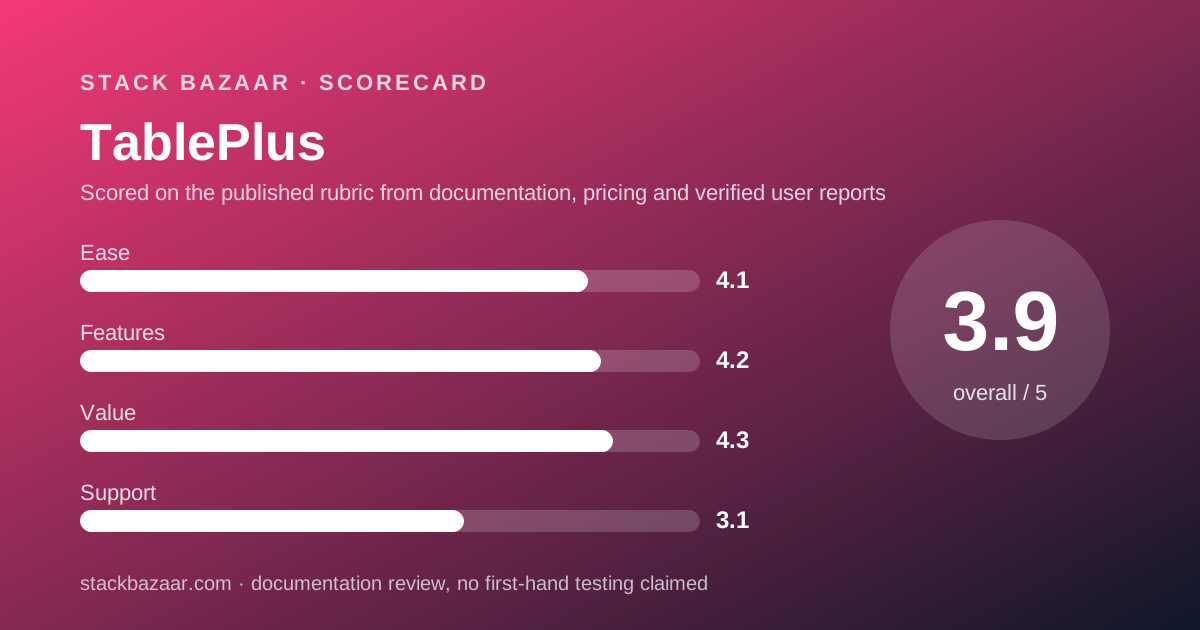
Scored on the published rubric, from documentation, pricing and verified user reports.
Best for: A freelance developer or analyst who works from one or two machines and would rather pay $99 once than carry another monthly tool.
Verdict
This is a documentation review. Every figure below was read from the TablePlus pricing page and the licensing page in its documentation on October 10, 2026, not from paid use of the application.
On those pages the deal is a genuine perpetual licence with an honest clock. You pay $99 USD once for one device and receive one year of updates and support. When the year ends you keep the last build released inside it, and the licensing page says you can run it without limitation forever. A further year of updates costs $59 per device.
Two things keep it from a higher value score. The licence is per computer, not per person, so a laptop and a desktop cost $129 on the two-device licence or $99 plus $79 for an extra device. And the refund window is seven days, among the shortest on this site.
The free version is not a trial but a capped build: two tabs, two windows, two advanced filters, with no time limit stated. For many solo users that cap is the real decision point.
Visit TablePlus
We have no affiliate relationship with this vendor. Link goes to the official site.
Where it is strong
- **$99 USD once for one device**, sold as a perpetual licence with no auto-renewal (pricing page, October 10, 2026).
- **You keep the build after the update year ends.** The licensing documentation states you can continue using the version released before expiry without any limitation forever (October 10, 2026).
- **Renewal is cheaper than the first purchase**: $59 per device for another year of updates, against $99 to buy (pricing page, October 10, 2026).
- **The free version has no stated time limit**, only a cap of two tabs, two windows and two advanced filters (pricing page, October 10, 2026).
- **One purchase covers Windows, macOS and Linux pricing**, and the iOS app is listed as free for owners of a PC licence (pricing page, October 10, 2026).
- **The licence can be moved** to a new machine by unlinking the old one in the License Manager, per the licensing documentation (October 10, 2026).
Where it falls short
- **Per-device, not per-person.** The licensing page states a single-seat licence entitles you to use TablePlus on one computer only (October 10, 2026).
- **Seven-day refund window**, the shortest among the pay-once tools reviewed on this site (pricing page, October 10, 2026).
- **Updates stop after one year** unless you pay $59 again, so the realistic cost for a current build is $99 plus $59 a year (pricing page, October 10, 2026).
- **Advanced filters are not available in the free Windows version**, and the page says free limits can change without notice (October 10, 2026).
- Support commitments are thin on the published pages: priority support is listed only for the Team tier, and no response time is printed anywhere we could find.
At a glance
| Starting price | $99 USD one-time, one device |
|---|---|
| Pricing note | $99 USD once for one device, including one year of updates; $59 to renew the update year (pricing page, checked October 10, 2026) |
| Two-device licence | $129 (listed against $198, "Save 35% off") |
| Team licence | $79 per seat, minimum 3 seats, one device per seat, quote required |
| Update window | 1 year from purchase; the licence itself does not expire |
| Renewal price | $59 per device for a further year of updates |
| Extra device | $79 per device |
| Free version | Capped at 2 tabs, 2 windows, 2 advanced filters; no time limit stated |
| Refund window | 7 days, no reason required |
| Platforms | macOS 12+, Windows (.NET 4.8), Linux, iOS 15+ (iOS free with a PC licence) |
| Payment processor | Paddle.com (handles invoices and tax) |
Why a $99 database client is a deal worth writing up
TablePlus has no sale running, and it is here for the same reason as Sublime Text: the regular price is already the kind of deal this magazine exists to find.
Most database clients that compete with it are sold by the month or the year, and the price never stops. TablePlus is sold once, per computer, and the vendor's own documentation says the build you have when the update year ends is yours for good.
That makes it a clean test case for the questions in how lifetime software deals actually work: what exactly is perpetual, what has a clock on it, and what the refund terms allow.
Everything below is read from the pricing page and the licensing documentation on October 10, 2026. None of it describes what the application is like to use, because this is a documentation review and we are not pretending otherwise.
What TablePlus is
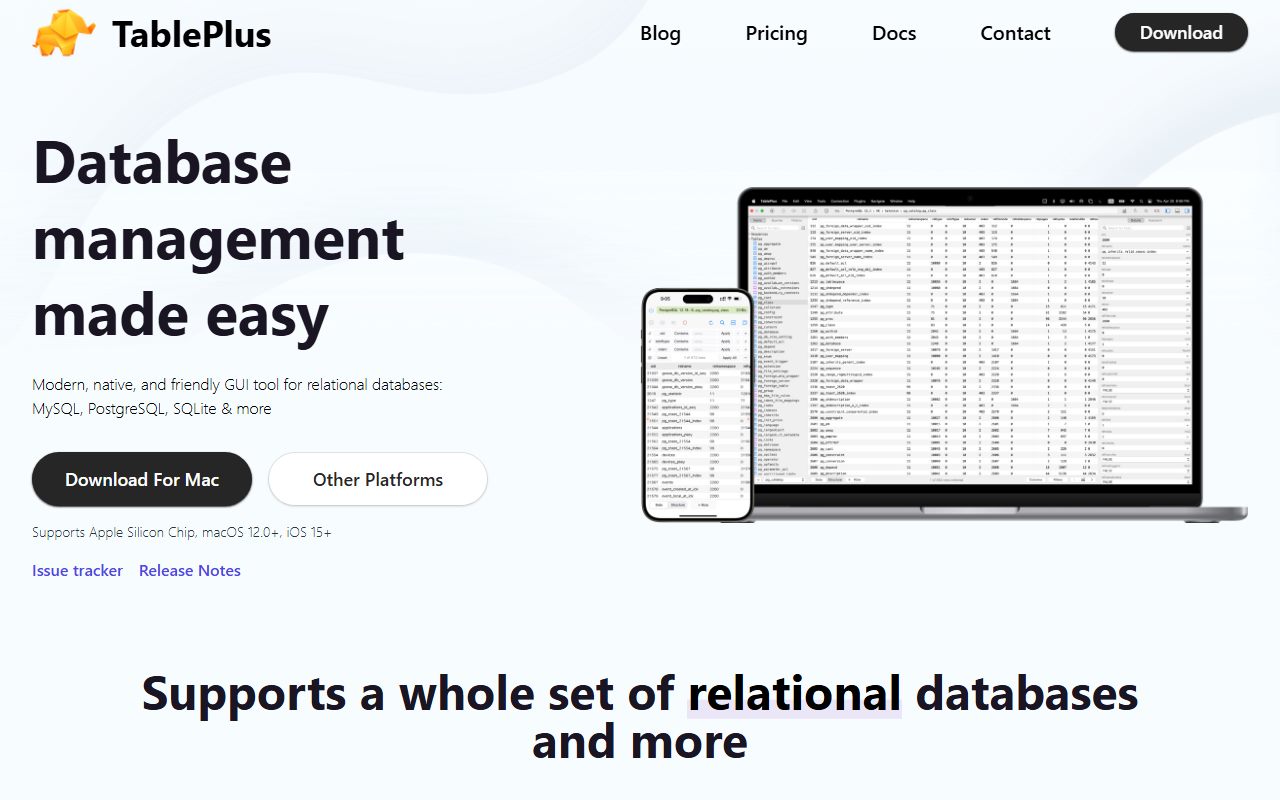
TablePlus is a native desktop client for relational databases, sold by a group the home page names only as the TablePlus Team. The home page lists no legal company name or address, and the pricing page says payments, invoices and tax are handled by Paddle.com.
The home page, checked October 10, 2026, names MySQL, PostgreSQL, SQLite, Microsoft SQL Server, Amazon Redshift, MariaDB, CockroachDB, Vertica and Redis in its text, and shows further logos for MongoDB, Oracle, Cassandra, BigQuery, ClickHouse and TursoDB.
It runs on macOS 12 or later with Apple silicon support, on Windows with .NET 4.8, on Linux, and on iOS 15 or later. The pricing page states that the prices shown apply to Windows, macOS and Linux, and that the iOS version is free for owners of a PC licence.
It is not a hosted service. There is no account to keep alive and no server the vendor can switch off to stop your copy working, which matters for anything bought on a pay-once basis.
What $99 buys, as of October 2026
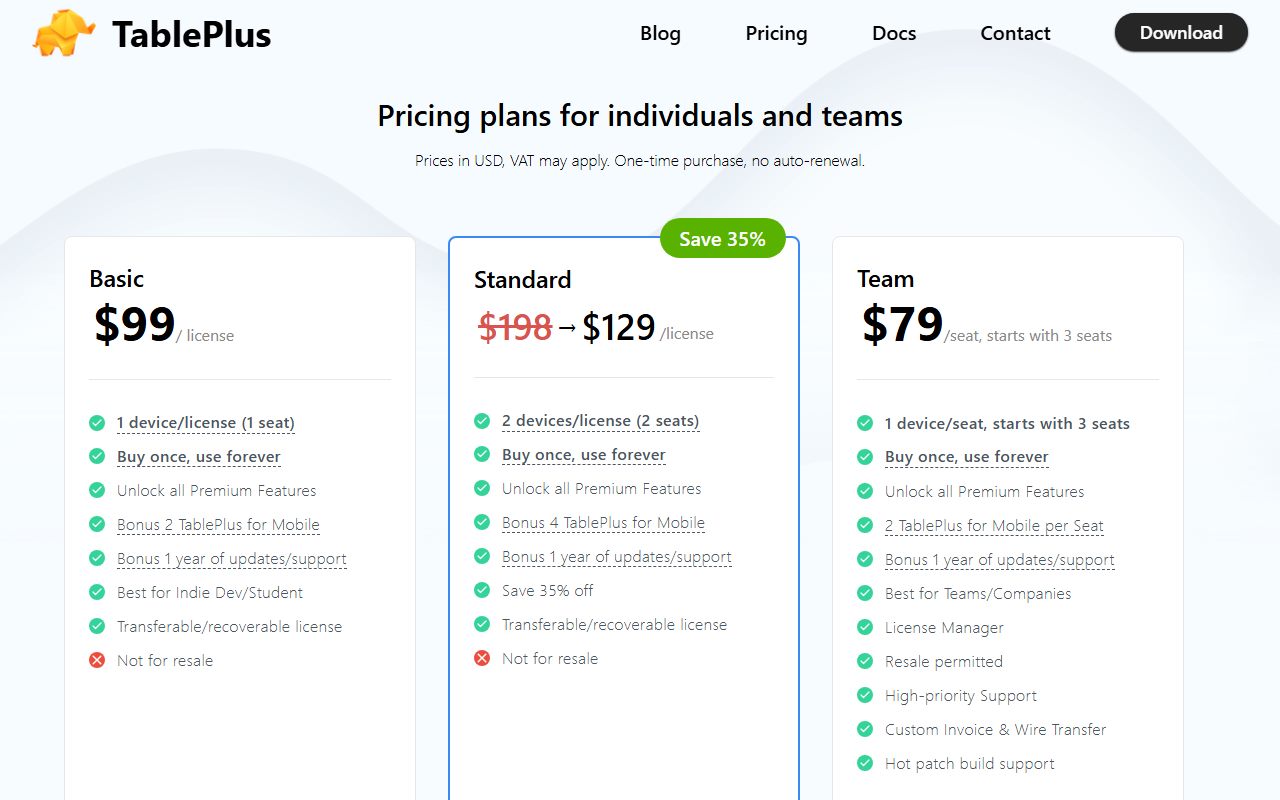
Per the pricing page on October 10, 2026, the Basic licence is $99 USD and covers one device, described on the page as one seat. It is a perpetual licence, and the page lists a bonus year of updates and support.
The page is explicit that this is a one-time purchase with no auto-renewal. Prices are in USD and VAT may apply depending on where you buy.
The licensing documentation says the same thing in plainer words: this is a perpetual, lifetime licence that includes one year's worth of updates. The two documents agree, which is not always the case on vendor sites.
- Basic: $99 for one device, one year of updates and support.
- Standard: $129 for two devices, shown against a struck-through $198 with the label "Save 35% off".
- Team: $79 per seat, starting at three seats, one device per seat, quote required.
- Renew an existing licence: $59 per device for a further year of updates.
- Add an extra device to an existing licence: $79 per device.
The one-year clock, and what stays when it runs out
This is the clause that decides whether a pay-once deal ages well, and TablePlus prints it clearly.
The licensing documentation, checked October 10, 2026, states that after one year you can renew to keep receiving updates, or keep using the build that was released before your licence expired, and that you can use it without any limitation forever.
So the licence is perpetual and the update entitlement is annual. That is the same shape as Sublime Text's three-year window, only shorter, and it is the shape described in what happens after you pay once.
The practical arithmetic, which is ours and not the vendor's: a user who wants to stay current pays $99 in year one and $59 in each year after. Over three years that is $217 for one device. A user who freezes pays $99 and nothing more.
Per device is not per person, and it changes the price
The most important sentence on the licensing page is also the shortest: your licence entitles you to use TablePlus on one computer only.
This is the opposite of Sublime Text, whose sales FAQ lets one key cover every machine where you are the primary user. For TablePlus, a laptop and a desktop are two seats.
The pricing page offers two routes for that case. The Standard licence covers two devices for $129. Or you buy Basic for $99 and add an extra device for $79, which is $178, so the two-device licence is the cheaper path for anyone who knows upfront they need two.
Moving between machines is allowed. The documentation says to unlink the old device through the License Manager and activate the new one with the same key. A replaced laptop therefore does not cost a new seat; a second concurrent laptop does.
Who it is best for
The licence terms, more than the feature list, decide who this suits.
- A freelance developer who works from one machine and wants a client that is paid for and done.
- A data analyst who queries Postgres or MySQL a few times a week and cannot justify a monthly tool.
- A Mac user who also wants the iOS client, which the pricing page lists as free with a PC licence.
- Anyone who has already lived inside the free version's two-tab cap and knows what the paid build removes.
- A buyer who prefers a vendor whose pricing page says one-time purchase, no auto-renewal, in those words.
Who should skip it
Two groups should read the device clause twice before paying.
- People who work across three or more computers, for whom the per-device model quickly costs more than an annual subscription elsewhere.
- Teams that need support with a response time, since priority support is listed only on the Team tier and no time is promised even there.
The free version is a cap, not a countdown
Per the pricing page on October 10, 2026, the free version of TablePlus is limited to two opened tabs, two opened windows and two advanced filters at a time. Filters are not available in the free Windows version at all.
The page states no time limit, which makes the free build an evaluation you can run for as long as you like. It also says the limits can change without notice, so the cap on the day you read this may differ.
For a refund window as short as seven days, this matters. The sensible order is to use the free build until you know the two-tab cap is the thing stopping you, then pay. Buying first and evaluating inside the refund week is the expensive way round, as how to read a software deal before you pay argues.
Value: what the score is built from
Our value score is the highest of the four pillars, and it rests on three published facts rather than on enthusiasm.
First, the licence is genuinely perpetual, with the frozen-build promise written in the documentation rather than implied. Second, renewal at $59 is cheaper than the $99 entry price, so staying current is not punished. Third, the free build has no clock, so the evaluation costs nothing.
What holds the score back is the per-device model and the seven-day refund. Against Sublime Text at $99 for every machine you own and 30 days to change your mind, TablePlus asks more of a two-machine buyer and gives less time to reconsider.
For the wider field, including the writing tools in this cluster, see the best pay-once software for freelancers.
Features and ease of use: what the scores are built from
Both scores come from the published feature list and the documentation, and we have kept them deliberately moderate because we have not graded the product in use.
The features score reflects the breadth of database support printed on the home page, the native builds for four platforms, and the License Manager described in the documentation for moving and transferring seats. The documentation also covers lost keys and changing the owner email, which are the unglamorous parts of a perpetual licence that vendors often leave out.
The ease score reflects a free build identical to the paid one except for the caps, which means the evaluation shows you the real product. We found no published figure for the current version number on the home page, which links to release notes we could not open on October 10, 2026.
Support: what is actually promised
Support is our lowest score, scored on commitments rather than on anyone's experience.
The pricing page lists support as part of the one-year entitlement that comes with each licence, and lists high-priority support, custom invoices and wire transfer as Team-tier benefits. No channel, hours or response time are printed for the Basic or Standard tiers.
The licensing documentation routes lost keys and ownership transfers to the License Manager first, and to an email address second. That is a self-service design, and it is adequate for a $99 product, but it is not a promise.
What verified users report
The verified-review picture is thin and we are not going to inflate it.
On October 10, 2026, Trustpilot listed five reviews for tableplus.com with a TrustScore of 2.7, one of them a five-star review praising performance on large databases, and one a one-star review that describes a slot game and appears unrelated to this product. Trustpilot itself notes the sample may not be representative.
We could not read the G2 or Capterra listings on the same day because both sites returned access errors to our requests, so we have no aggregate rating to quote from them. Where a figure is missing here, it is because we could not verify it, not because it does not exist.
Alternatives
Two comparisons are worth making before paying, both against products reviewed on this site.
Choose Sublime Text if your need is a code editor rather than a database client; its $99 personal licence covers every machine you own and carries a 30-day refund window. Otherwise choose TablePlus if the job is querying and editing databases, which Sublime Text does not do.
For writers rather than developers, the pay-once writing tools reviewed in this cluster, Scrivener and Final Draft, show the same perpetual-plus-clock structure at different prices, and the Scrivener vs Final Draft comparison sets the two side by side.
Within the database category, TablePlus's own Team tier is the alternative for a group: $79 per seat from three seats, with resale permitted and a License Manager, per the pricing page on October 10, 2026.
What we could not verify
Three gaps, stated rather than filled.
We did not buy a licence, so we cannot confirm delivery time, how the one-year clock is displayed inside the application, or how the seven-day refund works in practice.
We could not open the release notes page on October 10, 2026, so we cannot state the current version number or the cadence of recent releases, which matters for a licence whose value depends on continued development.
We could not find a legal company name or registered address on the home page or pricing page, and the licensing documentation names only the payment processor.
Bottom line
If you work from one computer, TablePlus is a real pay-once deal with honest terms: $99 USD, a licence that does not expire, a build you keep when the update year ends, and a renewal that costs less than the purchase.
If you work from two, buy the $129 two-device licence rather than adding a seat later. If you work from three or more, do the arithmetic against a subscription before you commit, because the per-device model is where this deal stops being cheap.
And whatever you decide, run the free build first. Seven days is not long enough to evaluate anything, and the vendor has given you a capped version with no clock precisely so you do not have to.
Sources
Every figure above was read on October 10, 2026 from the following pages.
- TablePlus pricing page: tableplus.com/pricing
- TablePlus licensing documentation: docs.tableplus.com/utilities/licensing
- TablePlus home page: tableplus.com
- Trustpilot listing for tableplus.com
Buy it if
- You work from one or two machines and the per-device model costs you $99 or $129, not a seat for every laptop you own.
- You can live on a frozen build. A database client that stops gaining features after a year is still a database client, and the licence keeps working.
- You have already hit the free version's cap of two tabs and two windows and know the paid build is worth $99 to you.
- You want a predictable renewal: $59 a year per device if you choose to stay current, and nothing if you do not.
Skip it if
- You rotate between many machines. Each one needs its own seat, and an extra device is $79, so three computers cost more than many annual subscriptions.
- You need a long refund window to evaluate. Seven days is short; use the capped free version for your evaluation instead and buy only when sure.
- You need vendor support with a stated response time. The published pages promise none for the Basic licence.
Frequently asked
Is TablePlus a one-time purchase?
Yes. The pricing page, checked October 10, 2026, describes every licence as a one-time purchase with no auto-renewal. The Basic licence is $99 USD for one device and includes one year of updates. After that year you keep the last build you received, per the licensing documentation.
What happens when the TablePlus licence expires?
The licence does not expire; the update entitlement does. The licensing documentation, checked October 10, 2026, states you can keep using the version released before your licence expired without any limitation forever, or renew for $59 per device to receive another year of updates.
How many computers can I install TablePlus on?
One per seat. The licensing page states on October 10, 2026 that a single-seat licence entitles you to use TablePlus on one computer only. The two-device licence is listed at $129, an extra device at $79, and you can move a seat by unlinking the old machine in the License Manager.
Is there a free version of TablePlus?
Yes, and it has no stated time limit. The pricing page, checked October 10, 2026, caps the free version at two opened tabs, two opened windows and two advanced filters at a time, notes that filters are not available in the free Windows version, and says the limits can change without notice.
Can I get a refund on TablePlus?
Within seven days. The pricing page, checked October 10, 2026, offers a seven-day money-back guarantee with no reason required, claimed by email from the address used to buy the licence. Purchases through resellers are refunded by the reseller, not by TablePlus.
How much does TablePlus cost for a team of five?
The Team tier is $79 per seat with a three-seat minimum and one device per seat, per the pricing page on October 10, 2026, so five seats is $395 by our arithmetic. The page asks team buyers to request a quote, and the tier adds a License Manager, resale rights and priority support.
Sources
- TablePlus pricing page - checked October 10, 2026
- TablePlus licensing documentation - checked October 10, 2026
- TablePlus home page (supported databases and platforms) - checked October 10, 2026
- Trustpilot listing for tableplus.com - checked October 10, 2026
Update history
- October 10, 2026 - First published. Prices and licence terms read from the vendor's pricing page and licensing documentation on this date.
Visit TablePlus
We have no affiliate relationship with this vendor. Link goes to the official site.