 Stack

Final Cut Pro
A $299.99 one-time Mac editor with the clearest update promise in this market and a subscription now sitting beside it
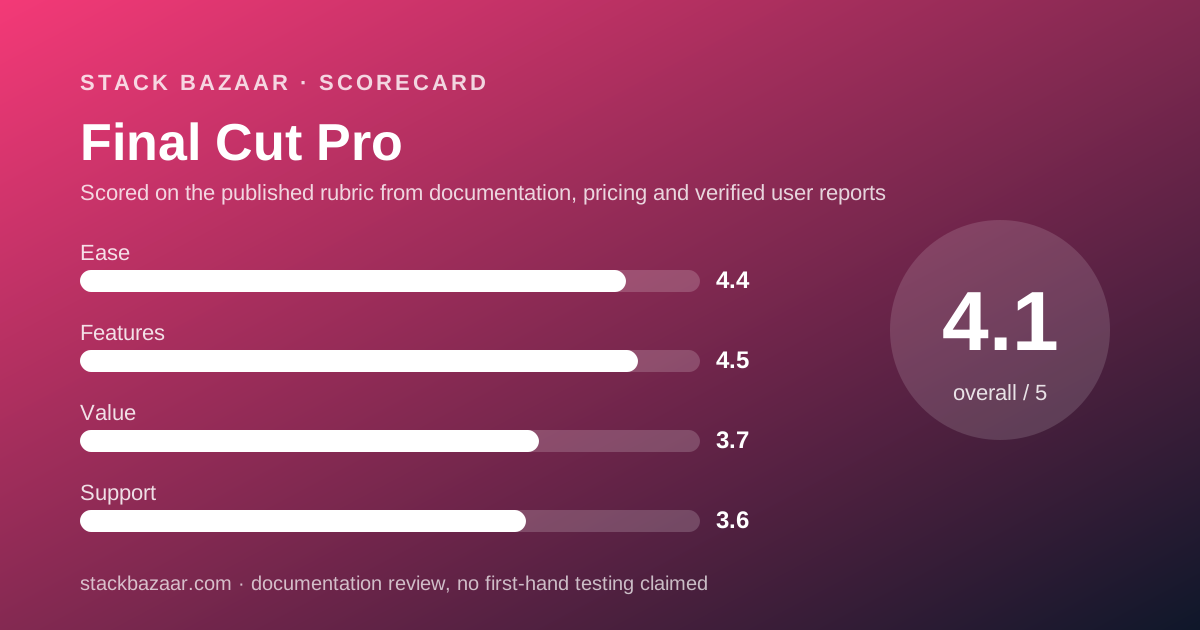
Scored on the published rubric, from documentation, pricing and verified user reports.
Best for: Mac editors who want a professional timeline for one payment and value a written commitment that an owned copy keeps being updated.
Verdict
This is a documentation review. It rests on Apple's Final Cut Pro product page and its seven published FAQ answers, the US Mac App Store listings for Final Cut Pro, Motion and Compressor, and the public written reviews on that store page, all read on October 22, 2026. Nobody here has graded the software in use.
The price is $299.99, once, and Apple prints it in its own pricing answer. The same answer prices the alternative: Apple Creator Studio at $12.99 per month or $129 per year, which bundles Final Cut Pro with Logic Pro, Pixelmator Pro, Motion, Compressor and MainStage.
The sentence that matters most to a pay-once buyer is in a different answer. Apple writes that "a one-time purchase will still be available" and that "if you already own Final Cut Pro, it will continue to be updated". That is more than most vendors in this market put in writing.
The cost of the one-time route is also stated: "access to some of the premium content is available only to Apple Creator Studio subscribers". Apple does not itemise which content, and that is the one gap in an otherwise unusually clear page.
Visit Final Cut Pro
We have no affiliate relationship with this vendor. Link goes to the official site.
Where it is strong
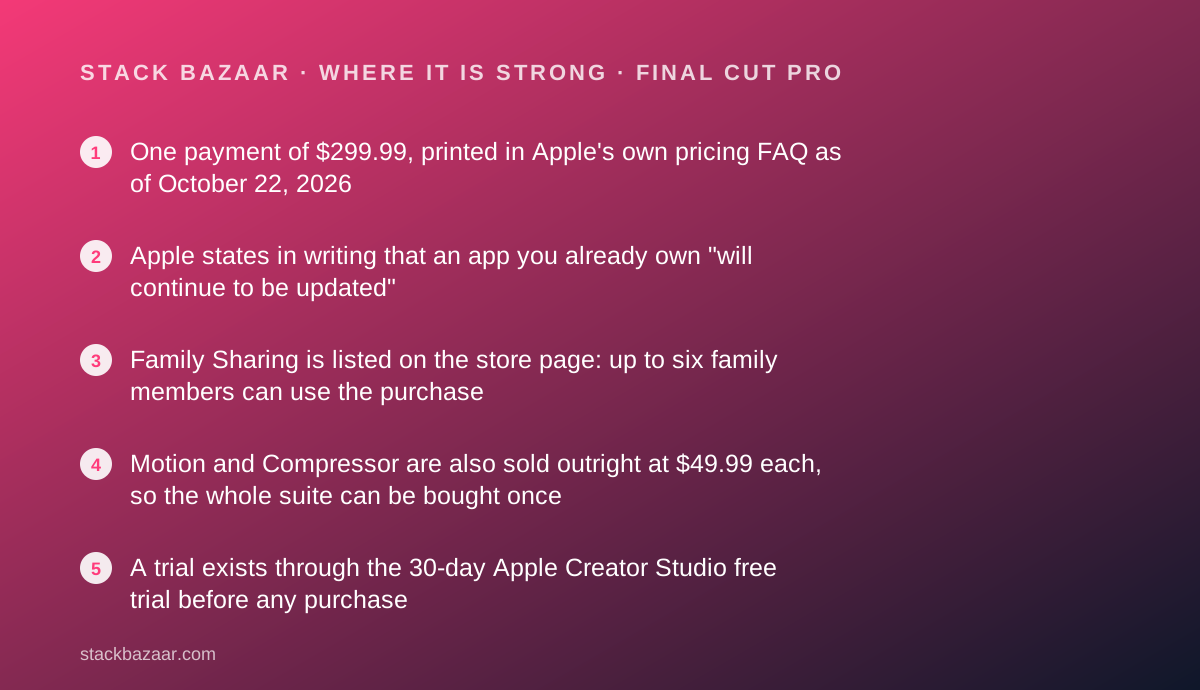
- One payment of $299.99, printed in Apple's own pricing FAQ as of October 22, 2026
- Apple states in writing that an app you already own "will continue to be updated"
- Family Sharing is listed on the store page: up to six family members can use the purchase
- Motion and Compressor are also sold outright at $49.99 each, so the whole suite can be bought once
- A trial exists through the 30-day Apple Creator Studio free trial before any purchase
Where it falls short
- $299.99 is the highest one-time price in this cluster, six times the cost of a pay-once image editor
- Apple says some premium content is subscriber-only without listing what it is
- Mac only, with the iPad version tied to the Apple Creator Studio subscription
- The two official pages disagree on requirements: "macOS 15.6 or later" on the product page, "Requires macOS 26.6 or later." on the store listing
- No aggregate buyer rating is shown on the store page, so there is no score to cite
At a glance
| One-time price | $299.99 on the US Mac App Store, confirmed on both the Apple product page and the store listing (October 22, 2026) |
|---|---|
| Pricing note | "Final Cut Pro is also available as a one-time purchase for $299.99", per Apple's pricing FAQ, checked October 22, 2026 |
| Subscription alternative | Apple Creator Studio at $12.99 per month or $129 per year after a 30-day free trial; education pricing $2.99 per month or $29.99 per year |
| Update promise | "If you already own Final Cut Pro, it will continue to be updated", per Apple's FAQ |
| What the subscription adds | "Access to some of the premium content is available only to Apple Creator Studio subscribers", plus the iPad version and the rest of the bundle |
| Current version | 12.4, listed at 6.4 GB, seller Apple Inc., category Photo & Video, copyright "Copyright © 2026 Apple Inc." |
| System requirement (store listing) | "Requires macOS 26.6 or later." |
| System requirement (product page) | "macOS 15.6 or later, 8GB of memory (16GB recommended), a Metal-capable graphics card (Intel-based Mac computers only), and 7.2GB of available disk space" |
| Household use | Family Sharing supported: "Up to six family members can use this app with Family Sharing enabled." |
| Companion apps | Motion $49.99 and Compressor $49.99 as one-time Mac purchases, both listed as requiring macOS 26.6 or later |
| Immersive video | "Apple Immersive Video processing requires 32GB of memory (64GB recommended). Storage read speed of 2GB/s or faster is recommended." |
| Buyer rating | None published: "This app hasn't received enough ratings or reviews to display an overview." |
What Final Cut Pro is, and what changed around it
Final Cut Pro is Apple's professional video editor for the Mac, sold outright on the App Store since the current generation launched. The software is not the news. The shelf it sits on is.
Apple now also sells Apple Creator Studio, a subscription bundle that contains Final Cut Pro, Logic Pro, Pixelmator Pro, Motion, Compressor and MainStage, plus enhanced versions of Keynote, Pages, Numbers and Freeform.
When a vendor adds a subscription beside a one-time product, the question for buyers is always the same: is the purchase being quietly retired? Apple answered that in writing, which is why this review spends more time on FAQ text than on features.
The short version is that the one-time door is open, the price is $299.99, and owners are told their copy keeps being updated. The qualifier is that some unspecified premium content is subscriber-only.
What the price actually is, as of October 2026
Apple's pricing answer, read on October 22, 2026, ends with: "Final Cut Pro is also available as a one-time purchase for $299.99." The US Mac App Store listing shows the same number.
The subscription is priced in the same answer: $12.99 per month or $129 per year for new subscribers after a 30-day free trial, with education pricing at $2.99 per month or $29.99 per year.
The arithmetic that follows is ours. $299.99 is about two years and four months of Creator Studio at $129 a year, and the subscription includes six other applications while the purchase includes one.
So the one-time purchase is not automatically the cheaper option. It is the option with a known total, which is a different thing, and the distinction is the whole subject of what happens after you pay once.
There is one more route worth pricing. Apple's download answer says you can get Final Cut Pro, Motion and Compressor "as one-time-purchase Mac apps on the App Store", and both companion listings showed $49.99 on October 22, 2026.
The full pay-once suite therefore lands at $399.97 by our addition.
The update sentence that sets this apart
One line in Apple's FAQ does more work than any feature on the page.
Asked to explain the difference between the subscription and the purchase, Apple replies: "A subscription to Apple Creator Studio bundles Apple's powerful creative apps for one low monthly payment.
A one-time purchase will still be available, but access to some of the premium content is available only to Apple Creator Studio subscribers. If you already own Final Cut Pro, it will continue to be updated."
Read that last clause against the rest of this market. Blackmagic publishes no upgrade statement on the pages that sell DaVinci Resolve Studio. Apple's own Pixelmator Pro FAQ carries no equivalent sentence either.
What Apple does not do is itemise the withheld content, or attach a version number or end date to the update commitment. So the promise is real and the boundary is vague.
That combination is still better than silence. A buyer can at least quote the sentence back, which is the test our guide to how lifetime software deals actually work applies to every one-time licence.
What the store listing shows, and where it contradicts the product page
The US Mac App Store listing is the page that gates the download, and it carries the build facts.
It lists version 12.4 at 6.4 GB, seller Apple Inc., category Photo & Video, age rating 4+, copyright "Copyright © 2026 Apple Inc. All rights reserved.", ten interface languages, a licence agreement link, and Family Sharing for up to six family members.
The requirement line is where the two Apple pages part company. The store listing says "Requires macOS 26.6 or later."
The product page's requirements answer says something else. Final Cut Pro for Mac "requires macOS 15.6 or later, 8GB of memory (16GB recommended), a Metal-capable graphics card (Intel-based Mac computers only), and 7.2GB of available disk space".
Both strings were read on October 22, 2026. We are not picking a winner, we are printing both, because the gap between them is the difference between an older Mac being supported or not.
The release notes for 12.4 describe editing Cinematic mode effects recorded in Final Cut Camera to adjust focus points and depth of field, plus stability improvements, with a footnote on the listing that reads "Requires macOS Golden Gate 27 or later".
Who it is best for
The $299.99 purchase fits a clear profile.
- Mac editors who deliver client work and want the licence cost to end
- Editors leaving a monthly plan who need a timeline that imports existing projects
- iMovie users moving up, since Apple's FAQ confirms iMovie projects import directly
- Households sharing one purchase across up to six people with Family Sharing
- Writers and producers assembling a pay-once chain from script to cut, next to tools like Final Draft
- Buyers building the pattern described in best pay-once software for freelancers
Who should skip it
Three groups should not pay this price.
- Windows and Linux editors, since there is no version for either platform
- iPad-first editors, because Apple ships the iPad app only through Creator Studio
- Anyone who needs grading, audio post and stills in one payment, where a cheaper rival covers all three
Features: what the score is built from
Features score 4.5, built from Apple's published list rather than from anyone's time in the timeline.
The editing model is the Magnetic Timeline, which Apple describes as letting you move and trim clips "all while keeping everything in sync". Magnetic Mask isolates people and objects "without a green screen or complicated rotoscoping".
The search tools are the newer part. Visual Search locates objects and actions by typed description, and Transcript Search analyses speech to find spoken phrases "whether by exact match or by related words". Captions are generated by analysing spoken audio.
Apple also lists Object Tracker for attaching titles and effects to moving subjects, Enhance Light and Color for automatic correction, Smooth Slo-Mo for generated intermediate frames, and Beat Detection that maps song parts, bars and beats to a grid.
Grading is covered with colour curves, hue and saturation curves, a colour inspector with wheels and LUT support. That is a real toolset, and it is narrower than a dedicated grading application.
The half point comes off for the unnamed premium content. A feature list you cannot fully verify for your own tier is a feature list with an asterisk.
Ease of use: what the score is built from
Ease scores 4.4, the highest in this cluster, and the reasoning is structural.
Final Cut Pro is one workspace, not eight.
Apple positions it for both beginners and professionals, answering its own FAQ question with "No, Final Cut Pro is a full-featured video editing application with all the power professionals need, yet it's intuitive enough for editors who are just beginning".
The migration path supports that. The FAQ confirms iMovie projects created on Mac, iPad or iPhone can be imported and edited with the full toolset, so a first-time buyer is not starting from an empty timeline.
The 30-day Creator Studio trial is the practical way to test the interface before spending $299.99, since there is no separate trial of the purchased version described on the page.
The deduction is the requirement confusion. An app whose two official pages disagree about the minimum macOS version creates avoidable work for the buyer.
Value: what the score is built from
Value scores 3.7, the weakest pillar, and the number is the reason.
$299.99 is the most expensive one-time purchase in this cluster. Against it, Blackmagic was asking $236 for a licence that covers Mac, Windows and Linux and adds grading, Fusion effects, Fairlight audio and a stills page.
What buys the score back is certainty. The written update sentence, Family Sharing across six people, and the option to complete the suite with Motion and Compressor at $49.99 each all reduce the chance of a second invoice.
There is also a resale-free, seat-free simplicity here. No renewal date, no user count, no annual check-in is described in the terms we read, which is the quiet advantage of App Store purchases over licence-key products.
For comparison inside our own catalogue, the pay-once pattern on the writing side runs the same way: Scrivener and Final Draft both charge once and sell major versions separately, and our Scrivener versus Final Draft comparison walks through how those terms differ in practice.
Support and what buyers report publicly
Support scores 3.6. Apple publishes documentation, a licence agreement and a developer website link on the store listing, and the product page points to the Final Cut Pro ecosystem resources. No response time or support window is stated.
The public buyer signal is thinner than the app's reputation suggests. The store page carries the line "This app hasn't received enough ratings or reviews to display an overview", so there is no star average to quote for this listing.
Written reviews are visible, and they are a mix. One dated July 1 praises the licence rather than the software, noting that the writer has never had to pay to maintain the app since purchasing it years ago.
Another, dated 07/10/2017, defends the app against the criticism that followed the Final Cut Pro X transition. A third is titled "One Frustrating Flaw".
Those are public, dated and unpaid, and they are reported here as individual opinions, not as evidence of how the app performs. The oldest ones predate the current version by several releases.
Alternatives
Three alternatives cover most of the decision.
Choose DaVinci Resolve Studio if you want the widest licence for the least money. On October 22, 2026 the Blackmagic page asked $236, the software runs on three operating systems, and a free version lets you try everything first.
Otherwise choose Final Cut Pro if you want the written update promise and a single-window editor.
Choose Apple Creator Studio at $129 a year if you want Logic Pro, Pixelmator Pro and the iPad apps as well. Otherwise choose the purchase if a fixed total matters more than breadth.
Choose Pixelmator Pro at $49.99 if the real job is stills and the video work is occasional. It is Apple's own, it is a fraction of the price, and it has no renewal date either.
If you are building the rest of a one-payment workflow around the edit, our reviews of OmniFocus 4 and Things 3 cover the project side, and Affinity by Canva covers the graphics side at $0.
Bottom line
Final Cut Pro is the most expensive one-time purchase in this market and the one with the clearest paperwork. $299.99, shareable with up to six family members, with Apple stating that an owned copy will continue to be updated.
It is also the narrowest of the three. Mac only, no iPad app without a subscription, and an unnamed slice of premium content reserved for subscribers.
If you edit on a Mac and want the invoice to stop, this is a defensible $299.99. If you want one payment to cover colour, audio, effects and stills across any operating system, the cheaper Resolve licence does more for the money.
Buy it if
- You edit on a Mac and want a professional timeline with no renewal date
- The written update sentence matters to you more than the lowest price
- You want the purchase shared across a household through Family Sharing for up to six people
- You will also use Motion and Compressor, which can be bought once at $49.99 each
Skip it if
- You work on Windows or Linux, where this app does not exist
- You need the iPad version, which ships only inside Apple Creator Studio
- You want colour, audio post and stills in one licence, which a $236 Resolve Studio purchase covers for less
Frequently asked
Is Final Cut Pro still a one-time purchase?
Yes. Apple's FAQ, checked October 22, 2026, states "a one-time purchase will still be available" and prices it at $299.99 on the App Store. The US store listing shows the same figure.
How much does Final Cut Pro cost per month?
Nothing if you buy it outright. Through Apple Creator Studio it is $12.99 per month or $129 per year after a 30-day free trial, with education pricing at $2.99 per month or $29.99 per year.
Do I keep getting updates after a one-time purchase?
Apple's own words are "if you already own Final Cut Pro, it will continue to be updated". No end date or version limit is attached to that sentence on the page we read on October 22, 2026.
What does the subscription include that the purchase does not?
Apple says only that "access to some of the premium content is available only to Apple Creator Studio subscribers". The content is not itemised, so a buyer cannot price what they are giving up.
Which macOS version does it need?
The pages disagree. The product page lists macOS 15.6 or later with 8GB of memory and 7.2GB of disk space. The store listing says "Requires macOS 26.6 or later." Check the store page against your Mac before paying.
Can I buy Motion and Compressor once as well?
Yes. Apple's FAQ says you can get Final Cut Pro, Motion and Compressor as one-time-purchase Mac apps, and both companion store listings showed $49.99 on October 22, 2026.
Is it cheaper than DaVinci Resolve Studio?
No. Final Cut Pro is $299.99 against the $236 Blackmagic was asking on October 22, 2026, and the Resolve licence also covers Windows and Linux. Final Cut Pro answers with the clearer update promise.
Sources
- Apple product page for Final Cut Pro, including the seven-answer FAQ on pricing, updates and requirements - checked October 22, 2026
- Final Cut Pro on the US Mac App Store (price, version 12.4, size, requirements, Family Sharing, written reviews) - checked October 22, 2026
- Motion on the US Mac App Store ($49.99 one-time price) - checked October 22, 2026
- Compressor on the US Mac App Store ($49.99 one-time price) - checked October 22, 2026
Visit Final Cut Pro
We have no affiliate relationship with this vendor. Link goes to the official site.