 Stack

DEVONthink 4
A $99 to $499 licence that never expires, with a year of updates and an extension you can skip
Scored on the published rubric, from documentation, pricing and verified user reports.
Best for: People who want a searchable, encrypted store for their own documents on their own disk, and who are willing to read a licence page before paying.
Verdict
DEVONthink 4 is the most complete pay-once document manager on the Mac, and the most expensive one in this category.
A Standard licence is $99, Pro is $199 and Server is $499. Each covers two Macs and one year of updates, per the pricing page checked October 29, 2026.
This is a documentation review. The grades come from the vendor's pricing page, its editions table and its licence agreement, not from running the software.
The part worth reading twice is the extension model. When the update year ends the app keeps working, and the vendor states that extending later does not cost more than extending on time.
The cost of guessing the wrong edition is the real risk. Standard to Pro later is $99, the same as the gap at purchase. Standard to Server later is $399, against a $400 gap at purchase by our arithmetic.
Buy Pro if you want the AI features, OCR and email archiving. Buy Standard if you only want an encrypted, searchable store for files you already own.
Visit DEVONthink 4
We have no affiliate relationship with this vendor. Link goes to the official site.
Where it is strong
- The licence never expires: "Your license is always yours and never expires", per the pricing page FAQ read October 29, 2026
- Two seats are included in every edition, "valid for two Macs", not sold as an add-on
- Extending updates late costs the same as extending on time, per the same FAQ
- The trial is "Minimum 30 days or 150 hours of pure runtime", so idle days do not burn it
- Extension price does not rise with seat count, which is unusual in this price bracket
- Standard already includes encrypted databases, sync, versioning and smart rules per the editions table
Where it falls short
- Server is $499, five times the Standard price, for a web interface and access management
- Standard to Server later is $399 plus $49 per extra seat, so a wrong first guess is expensive
- The editions table lists Scripting and batch processing twice with different marks, so read it carefully
- The licence agreement read October 29, 2026 names a refund only as a warranty remedy, not a trial-period guarantee
- Requires macOS Ventura or later, so older Macs are out
At a glance
| Standard licence | $99, per the pricing page read October 29, 2026, before VAT or sales tax |
|---|---|
| Pro licence | $199, same page and date |
| Server licence | $499, same page and date |
| Seats included | Two, described as "valid for two Macs", with one year of updates |
| Extra seat | $49 Standard, $99 Pro, $99 Server; each extra seat also adds three months of updates |
| Update extension | $49 Standard, $99 Pro, $149 Server, and "independent of how many seats" the licence carries |
| Early extension prices | Standard $44, $79 or $104 for one, two or three years; Pro $89, $159 or $209; Server $134, $239 or $314 |
| Pricing note | "Standard $99 ... Pro $199 ... Server $499" per the DEVONtechnologies pricing page, checked October 29, 2026 |
| Upgrade from version 3 | $49 Standard, $99 Pro, $149 Server, "independent from the number of seats" |
| Edition upgrade | Standard to Pro $99 plus $49 per extra seat; Standard to Server $399 plus $49 per extra seat; Pro to Server $299 |
| Mobile seats | Pro includes five DEVONthink To Go seats, Server 25, "valid as long as the license is eligible for updates" |
| Free trial | "Minimum 30 days or 150 hours of pure runtime" |
| Licence expiry | None stated: "Your license is always yours and never expires" |
| Current version | 4.4.2, requiring macOS Ventura or later |
| Refunds | The licence agreement names a refund only where the software fails to conform to warranty |
What DEVONthink 4 is, and what DEVONtechnologies sells
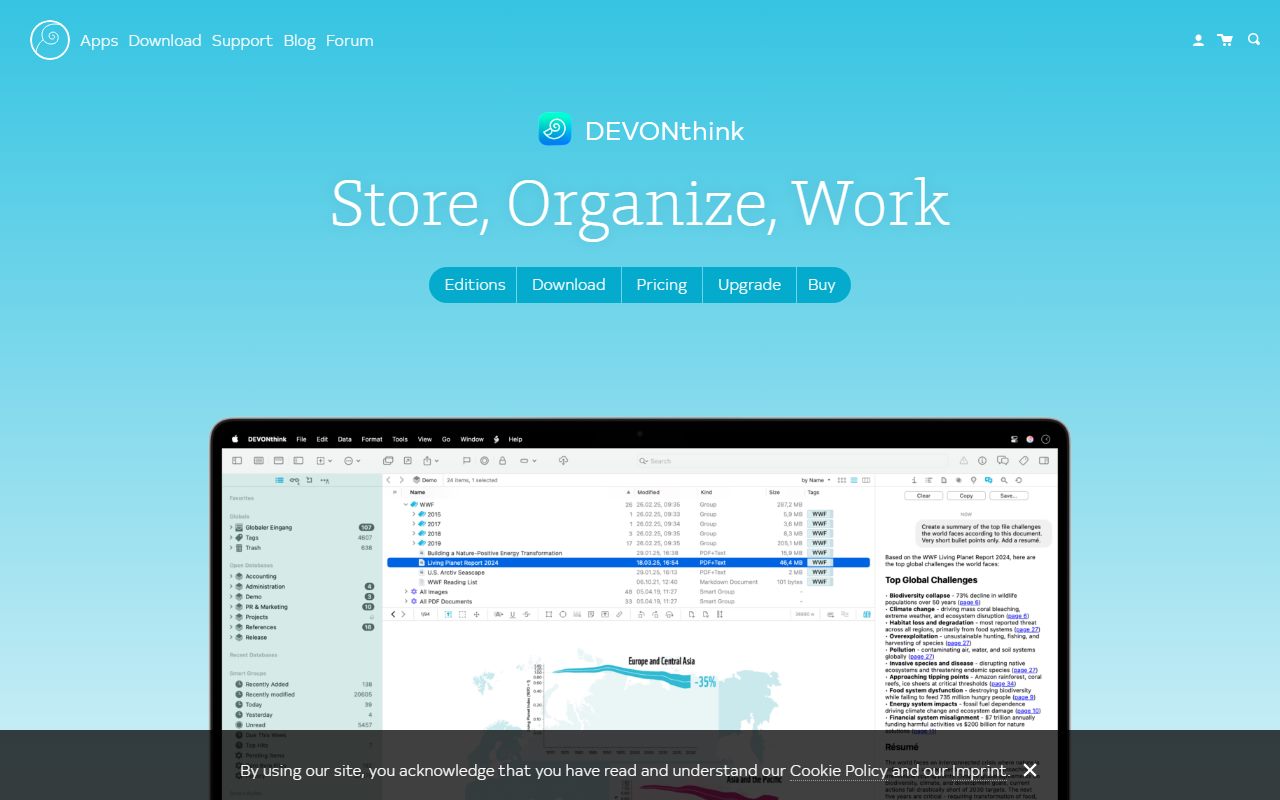
DEVONthink is a document database that lives on your Mac. You put files, web pages, emails and notes into it, and it indexes, tags, encrypts and searches them locally.
The vendor's own summary is short: "DEVONthink is your information manager. It stores your document and assists you in effectively organizing and working with them."
What is being sold is a perpetual licence with a time-limited update window. That is a different product from a subscription, and it is also different from a lifetime-updates licence.
If that distinction is new to you, our guide to how lifetime software deals actually work sets out the three models side by side before the money leaves your account.
The three editions, and what separates them
There are three editions and the gap between them is large. The pricing page lists Standard at $99, Pro at $199 and Server at $499, read October 29, 2026.
The editions table shows Standard already covering importing, indexing, sync, encrypted databases, revision-proof databases, versioning, universal item links, hierarchical tagging, newsfeeds, reading lists, annotations, See Also, Classify, templates and reminders.
Pro adds the headline items: generative AI integration, an interactive chat assistant, text summarisation, image generation, text transformation, assisted search, scanner integration with OCR, barcode scanning, PDF imprinting, email archiving, image and speech transcription, a download manager, concordance, graph and custom metadata.
Server adds exactly two rows on top of Pro: a web interface and granular access management. For $300 more than Pro, that is a narrow list unless you genuinely need browser access for a team.
What the licence actually includes
Two seats come in the box. The pricing page states that buying a licence "gives you the app itself including two seats, valid for two Macs, and one year of updates".
That is worth pricing out. Many pay-once Mac apps sell a single-machine licence, so a desktop and a laptop means buying twice.
Extra seats are $49 on Standard and $99 on Pro and Server. The page adds a detail most vendors would not volunteer: "the purchase of additional seats also adds three months of updates to your license".
Pro ships with five mobile seats for DEVONthink To Go and Server with 25, valid "as long as the license is eligible for updates". Standard includes none.
How the update year works, and what happens when it ends
This is the clause that decides whether the price is fair. The pricing page spells it out without hedging.
When the year of updates is up you can extend it, but the page states plainly that you do not have to, and that "The app will always be yours and fully functional."
The FAQ is blunter still. Asked whether the licence gets deactivated if you stop paying, the answer begins "No!" and ends "you can use it for as long as you want".
So the worst case is an app frozen on the last version you paid for. For a local document store that is a mild outcome, not a cliff. We walk through what that actually feels like in what happens after you pay once.
Who DEVONthink is best for
The fit is narrower than the feature list suggests, because most of the value is in local search and local storage.
- Researchers and students who collect PDFs faster than they read them, and need to find a sentence two years later
- Lawyers, accountants and consultants who want client files encrypted on their own disk rather than on someone's cloud
- Writers who want a reference library beside their drafting app, next to something like Scrivener or iA Writer
- Anyone running two Macs, because two seats are already in the $99
- People who archive email and want it searchable alongside documents, which the editions table puts in Pro
- Readers who already buy tools this way, like the picks in our pay-once software list for freelancers
Who should skip it
There are three clear exits.
- You want a visual board to think on, not a filing system; a canvas app is a different shape of tool
- You are on macOS Monterey or older, because version 4.4.2 requires Ventura or later
- You mainly need task management, where OmniFocus or Things are the cheaper fit
Upgrade and extension prices, read off the same page
Extensions are priced per edition, not per seat. The page lists $49 on Standard, $99 on Pro and $149 on Server, and says the price is "independent of how many seats" you own.
Extending early buys a discount and multi-year options. The early prices are $44, $79 or $104 on Standard for one, two or three years.
On Pro the early prices are $89, $159 or $209. By our arithmetic, three years bought early at $209 is $88 less than three single late extensions at $99 each.
Server early prices are $134, $239 or $314. Owners of version 3 upgrade for $49, $99 or $149 by edition, and the page states that the upgrade is independent of seat count.
Moving up an edition later costs more than buying it now
This is the one place where guessing wrong is genuinely expensive, and it is easy to miss on a first read.
Standard to Pro later is $99. The gap at purchase is also $99 by our arithmetic, so that route is neutral.
Standard to Server later is $399 plus $49 per extra seat. The gap at purchase is $400, so that route is nearly neutral too, until the per-seat surcharge lands.
Pro to Server later is $299, against a $300 gap at purchase. The vendor also offers to downgrade an edition before upgrading, and warns in its FAQ that downgrading "is not revocable".
The trial is unusually long, and measured in runtime
Most trials run on calendar days, which punishes anyone with a busy fortnight. This one does not.
The product page offers "Minimum 30 days or 150 hours of pure runtime", read October 29, 2026. The wording means the clock counts hours the app is actually running.
That matters for a document manager more than for most categories. You cannot judge a search index until you have fed it a real archive, and that takes weeks of ordinary work.
The practical advice is to import your messiest folder on day one, not your tidiest. A clean test library tells you nothing you need to know.
Ease of use: what the score is built from
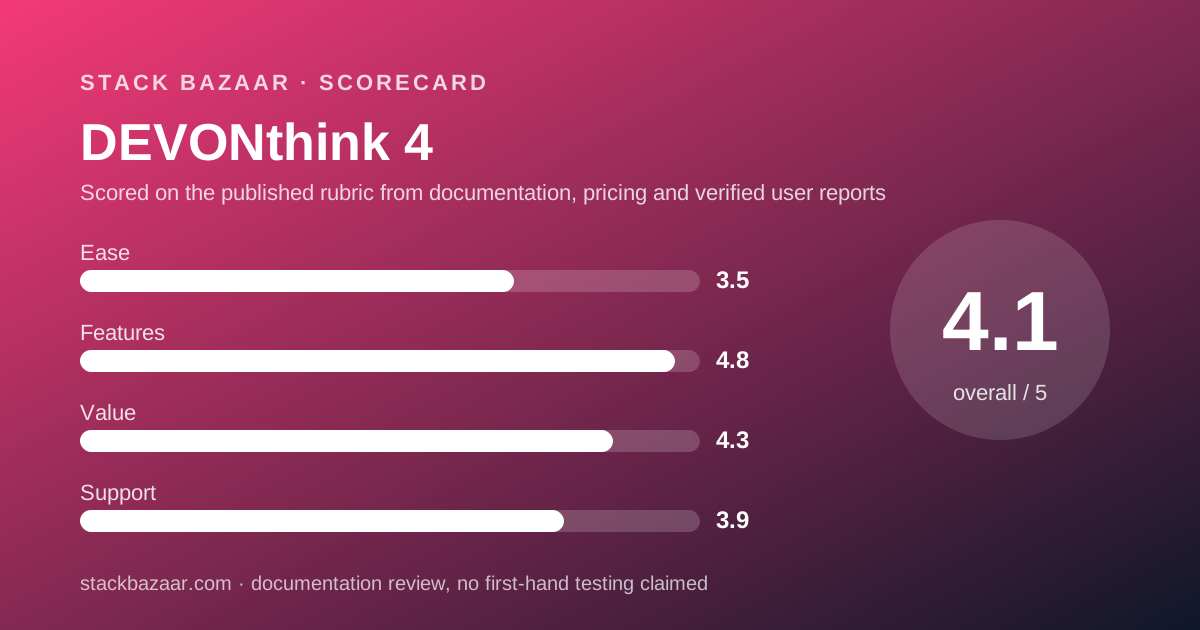
The 3.5 reflects surface area, not bad design. Standard alone lists eighteen capability rows in the vendor's own table.
The product page points to its own FAQ for "answers to many more questions you may have about DEVONthink, its technologies, and our license model". A tool that needs a licence FAQ is not a simple tool.
Against that, the vendor states support for assistive technologies including VoiceOver, which is more than most small Mac developers publish.
We have not graded the interface by using it. The score is a judgement on documented complexity: three editions, two seat types, an extension calendar and an upgrade matrix are four things to understand before you buy.
Features: what the editions table claims
On documented feature count this is the strongest product in the category, which is why features scores 4.8.
Encryption, sync, versioning and revision-proof databases sit in Standard. The vendor describes revision-proof databases as a version 4 feature that cannot be synced back to version 3.
Privacy is stated clearly on the product page: your database lives on your devices, "not on our servers", with the sync connection and the cloud copy optionally encrypted.
The AI features are opt-in rather than built in, and they sit behind the Pro tier along with OCR, email archiving and transcription. If you do not want them, Standard is not a stripped version of the app.
Where the vendor's own table contradicts itself
The editions page lists two rows twice, with different marks each time, and we are reporting it rather than picking a side.
Scripting appears once as available in all three editions, and again further down as Pro and Server only. Batch processing appears as available in all three, then "Batch processing & smart rules" appears as Pro and Server only.
The page itself carries a disclaimer: "This page lists only a selection of features to help you compare the editions. It does not claim to be complete."
If scripting is the reason you are buying Standard rather than Pro, ask the vendor in writing before paying. Our notes on reading a software deal cover how to get that answer on the record.
Value: what the score is built from
Value scores 4.3 because the arithmetic survives a long horizon, not because the sticker is low.
Standard at $99 covers two Macs forever. A $5 monthly tool costs $60 a year by our arithmetic, so the licence is cheaper from year two onwards even if you never extend.
Pro at $199 is harder to justify unless you want OCR or email archiving. Those two features alone replace separate purchases for many buyers.
Server at $499 is the weak point. Two extra table rows for $300 is a steep ask, and most individual buyers should treat it as a team purchase rather than an upgrade path.
Support: what is actually promised
Support is a public forum, an FAQ, a tips section, handbooks and a customer account area, per the site navigation read October 29, 2026.
Pro and Server also list a "Help chat assistant" in the editions table, which is an in-app feature rather than a staffed channel.
No response time, no business hours and no ticket system are published on the pages read. We tried the pricing page, the product page and the legal page and found none.
That is normal for a developer of this size, and it is why support scores 3.9 rather than higher. A long trial partly compensates: you find the rough edges before you pay, not after.
Refunds: what the licence agreement says
There is no money-back window stated in the documents read on October 29, 2026, and that is a real limitation.
The licence agreement offers a remedy only where the software fails to conform to warranty, in which case the vendor "may at its option either replace the Software free of charge to you or refund the purchase price".
For App Store purchases the agreement points at Apple: if the software fails to conform to warranty, "Apple will refund the purchase price".
So the trial is the safety net here, not the receipt. Use the full 150 runtime hours and import real work into it before the card comes out.
Alternatives
Two of them sit in this same pay-once corner, and one is free until you need more.
Curio from Zengobi is the visual answer to the same problem: a canvas with mind maps and kanban stacks instead of a database. Licences run $99.99 and $119.99 per its pricing page read October 29, 2026.
BBEdit from Bare Bones is the plain-text answer. It is $59.99 and keeps working forever in a reduced Free Mode after the 30-day evaluation.
For code and large text files rather than documents, Sublime Text remains the cheaper buy, and TablePlus covers structured data that does not belong in a document store at all.
What we could not verify
Three things, stated plainly so you do not mistake silence for approval.
We could not read any published support response time, ticket volume or staffing level for DEVONtechnologies on the pages read October 29, 2026.
We did not find a verified user rating with a sample size worth quoting. The vendor runs its own forum, which is useful reading but is not an independent review set.
We have not run the software, so nothing here grades search speed, OCR accuracy or sync reliability. Everything above comes from the vendor's own published pages on one date, and prices move.
Bottom line
Standard at $99 is the honest entry point and the one most readers should take. Two seats, encryption, sync and local search, with no obligation to pay again.
Pro at $199 is the right buy only if OCR, email archiving or the AI features are on your list. Decide that before purchase, because moving up later saves nothing.
Server at $499 should be a team decision justified by the web interface, not an individual upgrade.
Use the full trial, import something messy, and check the current prices in the cart. It sits alongside the rest of our pay-once productivity picks as the heaviest tool in the set and the one with the most to read before you buy.
Buy it if
- You want your documents on your own disk, searchable, with encrypted databases available in every edition
- You expect to keep the app for more than two years and want the option to stop paying without losing it
- You need OCR, email archiving or the AI features, which the editions table puts in Pro and Server only
- You run two Macs, because two seats are already in the price
Skip it if
- You want a visual canvas rather than a database; that is a different shape of tool
- You are on macOS Monterey or older, since version 4.4.2 requires Ventura or later
- You need a money-back window rather than a trial, because the licence agreement does not promise one
Frequently asked
Is DEVONthink a subscription?
No. The pricing page FAQ answers the question directly: "No. Even if you don't buy another year of upgrades, you can always use DEVONthink with all the features included in the latest version available to your license." Checked October 29, 2026.
How much does DEVONthink 4 cost?
Standard is $99, Pro is $199 and Server is $499, per the pricing page checked October 29, 2026. Each price includes two seats and one year of updates. VAT or sales tax is added in the cart.
What happens when the year of updates ends?
The app keeps running on the last version your licence received. The vendor states the licence is not deactivated and that you can download that version from your account at any time.
Does extending late cost more?
No, per the vendor's own FAQ: "the price for the extension does not increase if you extend your license later." Extending early instead earns a discount, and the early prices are $44, $79 or $104 on Standard.
Which edition do I need?
Standard covers importing, indexing, sync, encrypted databases, versioning and smart rules. Pro adds OCR, email archiving, the AI features and DEVONthink To Go. Server adds a web interface and granular access management.
Can I try it before paying?
Yes. The product page offers a trial of "Minimum 30 days or 150 hours of pure runtime", read October 29, 2026. That second figure matters, because a trial you forget about does not expire on you.
How many Macs does one licence cover?
Two. The pricing page states that a licence "gives you the app itself including two seats, valid for two Macs". Extra seats are $49 on Standard and $99 on Pro and Server.
Sources
- DEVONthink pricing page (edition prices, seats, extensions, upgrade prices, licence FAQ) - checked October 29, 2026
- DEVONthink product page (trial length, version 4.4.2, system requirement, buy sheet) - checked October 29, 2026
- DEVONthink editions comparison table (what Standard, Pro and Server each include) - checked October 29, 2026
- DEVONtechnologies software licence agreement (warranty and refund wording) - checked October 29, 2026
Visit DEVONthink 4
We have no affiliate relationship with this vendor. Link goes to the official site.