 Stack
Final Cut Pro vs DaVinci Resolve Studio: which to buy
Two professional video editors, two one-time payments, two very different deals. Final Cut Pro costs $299.99 on the US Mac App Store. DaVinci Resolve Studio was listed at $236, down from $295, on Blackmagic's US page. Both figures were read on October 22, 2026. This comparison is built from pricing pages, published FAQs and store listings, not from testing either application.
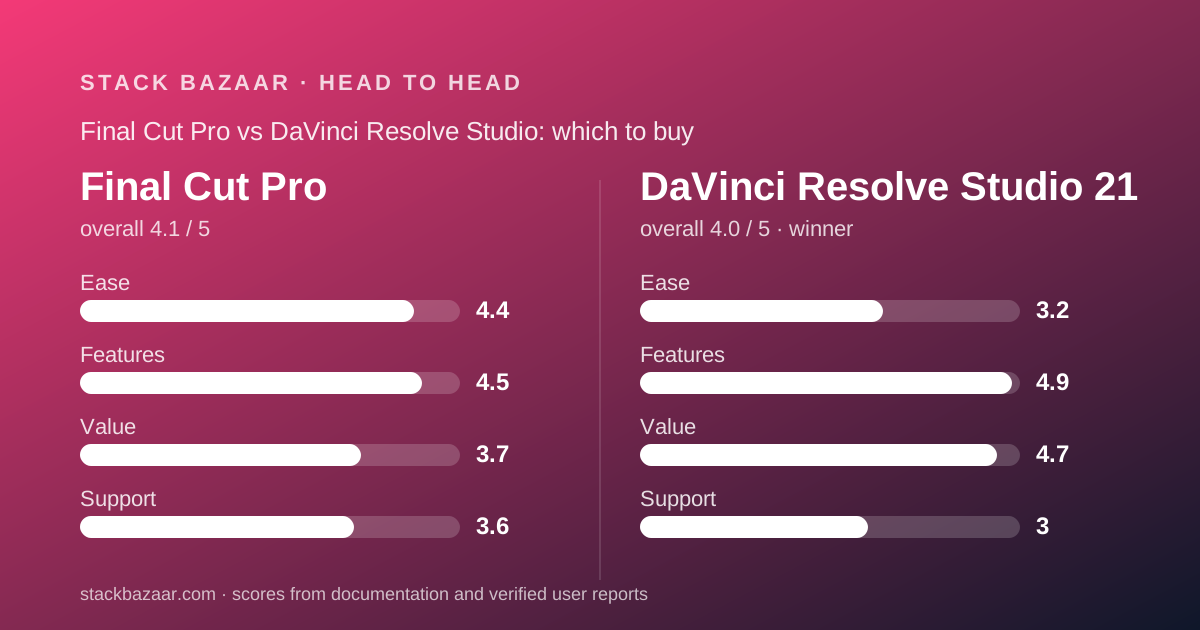
 4.1Final Cut Pro
Specification by specification
| Spec | Final Cut Pro | DaVinci Resolve Studio 21 |
|---|---|---|
| One-time price (October 22, 2026) | $299.99 on the US Mac App Store | $236, shown as "Was $295 Now $236" with a "Save 20%" badge |
| Subscription alternative | Apple Creator Studio, $12.99 per month or $129 per year | None offered |
| Free version | None; a 30-day Apple Creator Studio trial is the only free route | DaVinci Resolve 21, free, 8-bit formats to 60fps at Ultra HD 3840 x 2160 |
| Operating systems | macOS only; the iPad app requires the subscription | Mac 13.0 Ventura and 14.0 Sonoma or later, Windows 10 Creators Update, Windows 11, Rocky Linux 8.6 |
| Update commitment in writing | "If you already own Final Cut Pro, it will continue to be updated" | No statement on the product, Studio or tech specs pages read |
| What the paid version withholds | "Access to some of the premium content is available only to Apple Creator Studio subscribers" | Nothing is withheld from Studio; the free version lacks 10-bit, 120fps and the Neural Engine |
| Stills workflow | No stills page; Pixelmator Pro is a separate $49.99 purchase | Photo page added in version 21, with native Canon, Fujifilm, Nikon and Sony RAW |
| Audio post | Built-in audio editing inside the timeline | Fairlight page, up to 2,000 tracks, Voice Isolation, 5.1, 7.1 and 5th order ambisonics |
| Household or multi-machine use | Family Sharing: "Up to six family members can use this app" | Activation count not published on the pages read on October 22, 2026 |
| Current version | 12.4, listed at 6.4 GB | DaVinci Resolve Studio 21 |
| Stated requirements | Store listing: "Requires macOS 26.6 or later." Product page: macOS 15.6 or later, 8GB memory, 7.2GB disk | Mac 13.0 Ventura, Mac 14.0 Sonoma or later, Windows 10 Creators Update, Windows 11, Rocky Linux 8.6 |
| Companion one-time purchases | Motion $49.99 and Compressor $49.99 on the App Store | DaVinci Speed Editor hardware, "Was $435 Now $349" |
| Public buyer rating | None shown: "This app hasn't received enough ratings or reviews to display an overview." | Not sold through an app store, so no aggregate rating exists; a public vendor forum does |
| Cost of the full one-time suite | $399.97 for editor plus Motion plus Compressor, by our addition | $236 for editing, colour, Fusion, Fairlight and the Photo page |
The short answer
Both are real one-time purchases from large vendors, and neither is a trap. The decision comes down to how wide you need the licence to be and how much written reassurance you want.
- DaVinci Resolve Studio is best for buyers who want the most software for one payment: $236 covers editing, grading, Fusion effects, Fairlight audio and a new stills page, on Mac, Windows or Linux.
- Final Cut Pro is best for Mac editors who want a single-window timeline and a vendor sentence promising continued updates, and who will pay $299.99 for that certainty.
- Our pick on the rubric is DaVinci Resolve Studio, mainly because a free version lets you prove the software suits you before any money moves.
- Neither application was tested here. Every figure below comes from vendor pages and store listings read on October 22, 2026.
Price: Resolve Studio is about $64 cheaper, and the gap widens with companions
On the day we read both pages, Apple asked $299.99 and Blackmagic asked $236. The difference is about $64, and that is our subtraction, not a vendor claim.
The gap grows once you add the pieces each vendor sells next. Apple's FAQ says Final Cut Pro, Motion and Compressor are all available as one-time Mac purchases, and the two companions were $49.99 each, which totals $399.97 by our addition.
Blackmagic puts colour grading, node-based compositing and a 2,000-track audio page inside the single $236 licence. On paper, that is four tools for less than the price of one and two helpers.
One caveat on the Blackmagic number. It appears as "Was $295 Now $236" under a "Save 20%" badge, with no end date printed beside it. We checked for a deadline specifically, because a deals magazine should not invent a countdown.
Treat $295 as the regular price and $236 as the October 22, 2026 price. Apple's $299.99 has no promotional badge at all.
Paperwork: only Apple puts the update promise in writing
This is where Final Cut Pro earns its premium.
Apple's FAQ states: "A one-time purchase will still be available, but access to some of the premium content is available only to Apple Creator Studio subscribers. If you already own Final Cut Pro, it will continue to be updated."
We looked for the equivalent sentence on Blackmagic's product page, the DaVinci Resolve Studio page and the tech specs page, and did not find one. Whether version 22 is free for version 21 owners is not answered on the pages that sell the product.
That question is actively discussed in Blackmagic's own public forum, where buyers debate whether past free major upgrades will continue. Forum posts are user reports, not policy, and this comparison treats them as such.
Apple's wording is not perfect either. "Some of the premium content" is never itemised, so a one-time buyer cannot list what they are giving up. A vague promise plus a vague exclusion is still more than silence.
For the full method behind grading licence language this way, see how lifetime software deals actually work.
Risk: Resolve lets you work for free first, Final Cut Pro does not
The free DaVinci Resolve 21 is the most undervalued fact in this comparison.
Blackmagic states that the free version "works with virtually all 8-bit video formats at up to 60fps in resolutions as high as Ultra HD 3840 x 2160" and that it "includes multi-user collaboration and HDR grading".
That is not a crippled demo. A buyer can complete real projects, learn the eight-page interface, and only pay when a Studio-only capability blocks them, typically 10-bit footage or frame rates above 60.
Final Cut Pro has no free tier. The only free route Apple describes is the 30-day Apple Creator Studio trial, which means evaluating the app inside the subscription you may not want.
For a $299.99 decision, that difference in trial quality is worth real points on the rubric. Our Final Cut Pro review scores value at 3.7 for this reason among others.
Scope: one buys an editor, the other buys a post house
Final Cut Pro is a video editor with grading and audio tools attached. DaVinci Resolve Studio is five applications sharing one window.
Apple's published feature list covers the Magnetic Timeline, Magnetic Mask for isolating subjects without a green screen, automatic captions from spoken audio, Visual Search and Transcript Search, Object Tracker, Smooth Slo-Mo, Beat Detection, colour curves and LUT support.
Blackmagic's list covers the same editing ground across two pages, then adds the colour page with 32-bit float processing and YRGB colour science, the Fusion page with node-based compositing, the Fairlight page for audio post, and in version 21 the Photo page for RAW stills.
The Photo page is the newest reason this comparison is not a straight editing contest. Blackmagic describes it as bringing "Hollywood's advanced color tools to still photos", with native RAW from Canon, Fujifilm, Nikon and Sony and camera tethering.
If you shoot stills as well as video, that single page is worth more than any effect either vendor advertises. Apple's answer to stills is a separate $49.99 purchase of Pixelmator Pro, or the free Affinity by Canva.
Learning: Final Cut Pro is one window, Resolve is eight pages
Apple positions Final Cut Pro for both ends of the market, answering its own FAQ with the line that the app is "intuitive enough for editors who are just beginning their creative journeys". It also confirms that iMovie projects import directly.
Blackmagic organises its software as pages: media, cut, edit, Fusion, colour, Fairlight, photo and deliver. Each has its own layout and vocabulary, and the cut page is explicitly a different editing philosophy from the edit page.
That structure is why our reviews score ease 4.4 for Final Cut Pro and 3.2 for Resolve Studio. A node graph is not harder than a timeline in the abstract, but it is harder on day one.
The counterweight, again, is the free version. The cost of discovering you dislike node-based compositing is zero on Blackmagic's side and $299.99 on Apple's.
Platforms: Resolve wins on reach, Final Cut Pro on household sharing
Blackmagic's tech specs list Mac 13.0 Ventura and Mac 14.0 Sonoma or later, Windows 10 Creators Update, Windows 11, and Rocky Linux 8.6. One licence, three operating systems.
Final Cut Pro exists only on macOS, and the iPad version ships only inside Apple Creator Studio. For a Windows editor, the comparison ends here.
Apple answers with the App Store's sharing mechanism. The listing states that up to six family members can use the purchase through Family Sharing, which is a genuine multi-person licence for one payment.
Blackmagic does not publish an activation count on the pages that sell the licence. Forum threads describe an activation key covering two active machines with the option to deactivate and move, which is a user report we could not confirm against vendor documentation.
So the fair summary is this: Apple is clearer about who may use the purchase, Blackmagic is broader about where it runs.
Hidden costs: Apple upsells apps, Blackmagic upsells hardware
Neither vendor stops selling after the editor.
Apple's next invoices are software. Motion at $49.99 and Compressor at $49.99 are separate one-time Mac purchases, and the iPad app requires the $129-a-year subscription.
Blackmagic's next invoices are physical. The same product page that prices the licence at $236 also lists the DaVinci Speed Editor at "Was $435 Now $349", with colour panels, editor keyboards and Fairlight consoles priced above that.
The difference matters for budgeting. Apple's add-ons are optional capabilities; Blackmagic's add-ons are speed, and the software is complete without them.
A buyer who wants a known total should write down the full stack before paying either vendor, in the way our note on how to read a software deal before you pay recommends.
Requirements: Apple's two pages disagree with each other
This is a small thing that will cost someone money, so it belongs in a comparison.
Apple's Final Cut Pro store listing says "Requires macOS 26.6 or later." Apple's product page says the Mac app "requires macOS 15.6 or later, 8GB of memory (16GB recommended), a Metal-capable graphics card (Intel-based Mac computers only), and 7.2GB of available disk space".
Both were read on October 22, 2026. The store page is the one that controls the download, so that is the figure to check your Mac against.
Blackmagic's requirement list is narrower but internally consistent, naming Ventura and Sonoma on the Mac side rather than the current release.
For anyone editing immersive formats, Apple adds one more line worth budgeting for: "Apple Immersive Video processing requires 32GB of memory (64GB recommended)".
What public buyer reports show, and what they do not
Neither product gives a clean buyer score, which is unusual for software at this price.
The Final Cut Pro store page carries the line "This app hasn't received enough ratings or reviews to display an overview", so no star average can be quoted for that listing.
Individual written reviews are visible and dated, including one from July 1 praising the fact that no maintenance fees have ever been charged, and one titled "One Frustrating Flaw".
DaVinci Resolve Studio is not sold through an app store at all, so there is no aggregate rating to read. What exists instead is Blackmagic's public forum, which is useful for licence questions and useless as a rating.
That leaves documentation as the main evidence for both, which is exactly how both of our reviews are graded. Where a figure could not be read, both reviews say so with the date.
The cheap third option neither vendor will mention
A straight contest between $299.99 and $236 hides a question worth asking: does the job actually need either of them?
Apple sells Pixelmator Pro outright for $49.99 on the same store, and its feature list includes video layers, so simple masking, cropping and colour changes on footage are possible without a timeline at all.
That is not an editor, and it should not be sold as one. It is, however, the right purchase for someone whose real output is stills with the occasional clip, and it costs a sixth of the Apple editor.
At the other end, the free DaVinci Resolve 21 covers 8-bit footage to 60fps at Ultra HD with multi-user collaboration and HDR grading, per Blackmagic's own wording. Plenty of paid work fits inside that envelope.
So the honest decision tree has four branches, not two: free Resolve, $49.99 Pixelmator Pro, $236 Resolve Studio, $299.99 Final Cut Pro. Only two of them are purchases, and the cheapest correct answer is often one of the other two.
The same reasoning applies to the rest of a one-payment stack, from writing tools through to backups, which is the pattern our catalogue follows.
Choose Final Cut Pro if
Four conditions point to Apple.
- You edit only on a Mac and have no Windows or Linux machine in the workflow
- You want the written sentence that an owned copy will continue to be updated
- You need the purchase to cover up to six family members through Family Sharing
- You are moving up from iMovie, whose projects Apple confirms import directly
Choose DaVinci Resolve Studio if
Four conditions point to Blackmagic.
- You want colour, effects, audio post and stills inside one payment
- You need Windows or Linux, or expect to switch machines later
- You want to try the software properly first, using the free version on real projects
- You shoot 10-bit footage or above 60fps, which is the documented line between free and paid
Bottom line
DaVinci Resolve Studio takes this on the rubric. It costs about $64 less, runs on three operating systems, covers four disciplines plus stills, and lets a buyer prove the fit for free before paying.
Final Cut Pro keeps a narrow, real advantage. It is the only one of the two whose vendor writes down that an owned copy will keep receiving updates, and the only one with a published household-sharing rule.
If the money is the question, buy Resolve Studio. If the paperwork is the question, buy Final Cut Pro. Both decisions survive a reading of the actual pricing pages, which is more than most of this market manages.
For the wider ranking these two sit in, including the cheapest credible option, read our roundup of the best pay-once Mac backup apps for the licence-grading method and what happens after you pay once for the questions to ask after the invoice clears.
Frequently asked
Which is cheaper, Final Cut Pro or DaVinci Resolve Studio?
DaVinci Resolve Studio, by about $64. On October 22, 2026 Blackmagic listed $236, down from a stated $295, while Apple listed $299.99. Adding Motion and Compressor takes the Apple route to $399.97 by our addition.
Can I switch projects from one to the other?
Blackmagic states that DaVinci Resolve "works with all major file formats and post production software, making it easy to move files between DaVinci Resolve, Final Cut Pro, Media Composer, and Premiere Pro". Apple does not publish a matching claim in the other direction.
Is either one a subscription?
Neither purchase is. Apple also sells Final Cut Pro inside Apple Creator Studio at $12.99 per month or $129 per year, and Blackmagic offers no subscription at all for Resolve Studio.
Do both run on Windows?
No. DaVinci Resolve Studio lists Windows 10 Creators Update, Windows 11 and Rocky Linux 8.6 alongside macOS. Final Cut Pro is macOS only, with an iPad version available only through the subscription.
Which one handles photos?
DaVinci Resolve Studio 21, through its new Photo page with native Canon, Fujifilm, Nikon and Sony RAW support. Final Cut Pro has no stills workspace; Apple sells Pixelmator Pro separately at $49.99.
Visit Final Cut Pro
We have no affiliate relationship with this vendor. Link goes to the official site.
Visit DaVinci Resolve Studio 21
We have no affiliate relationship with this vendor. Link goes to the official site.