 Stack
The best pay-once Mac backup apps (2026)
Our top pick is Carbon Copy Cloner 7, because $49.99 USD plus local taxes covers every Mac in a household and Bombich publishes more of its own terms than anyone else here. SuperDuper 4 is the better place to start, since its unregistered mode makes full bootable backups free. ChronoSync is the one to buy if you will never willingly pay for an upgrade again, as long as you only need one Mac covered. All three are sold once rather than rented. All prices were read from the vendors' own pages on October 15, 2026. No testing of our own took place.
Our picks
- Best overall pay-once Mac backup app: Carbon Copy Cloner 7
- Best free starting point: SuperDuper 4
- Best update promise, for a single Mac: ChronoSync
The best pay-once Mac backup apps at a glance
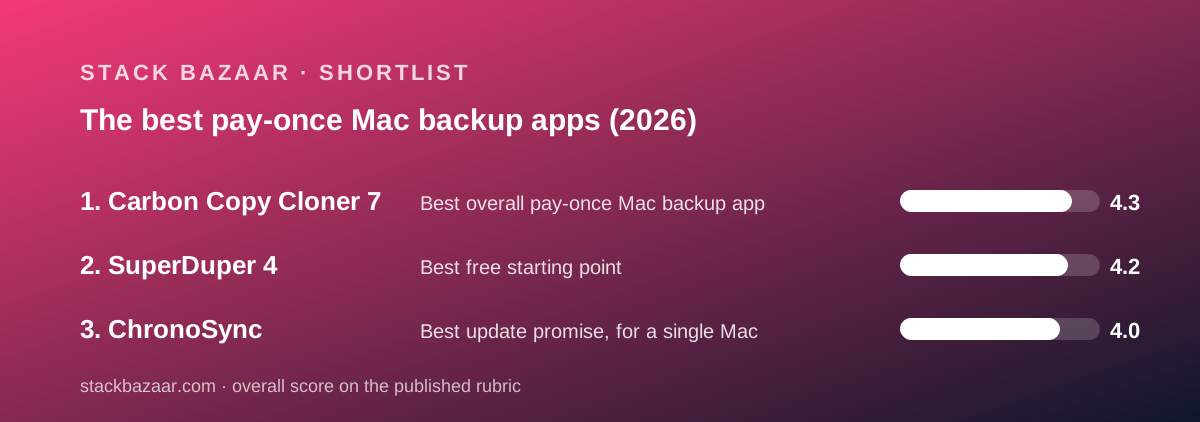
Three products, three different answers to the same question. The differences are in the licence, not the feature list.
- Carbon Copy Cloner 7 - best overall, and best for a household with more than one Mac. $49.99 USD plus local taxes.
- SuperDuper 4 - best free starting point, because erase-then-copy backups cost nothing. Store panel base price attribute reads $43.95 for a full licence.
- ChronoSync - best update promise, worst licence spread. $49.99 for one Mac, with free updates for life.
- All three produce bootable copies. All three were read on October 15, 2026.
- None of the three is sold on the Mac App Store, so none has a public buyer rating we could cite.
How we graded these, and what we did not do
We did not run backups of our own. Grades come from documentation, store panels, pricing articles and published terms, read on October 15, 2026. Nothing below is an impression of using the software.
Every figure carries the page it came from. Where WebFetch returned an empty or partial page, we rendered the page in a full browser before concluding anything. Two prices only exist inside page markup, and we say so where that is the case.
We did not convert currencies. One vendor's store rendered a price in Vietnamese dong to our reading machine. We report the symbol we saw and the vendor's own base figure separately, because a conversion would be our arithmetic dressed as a vendor price.
We weighted licence scope heavily. For backup software the question is rarely which app has more switches. It is how many Macs one payment covers, and whether the vendor will charge again at the next version.
We read the refund clause in every case. Two of the three publish one. The third does not, on any page we could find, and that is reported as a gap rather than filled in.
Best overall: Carbon Copy Cloner 7
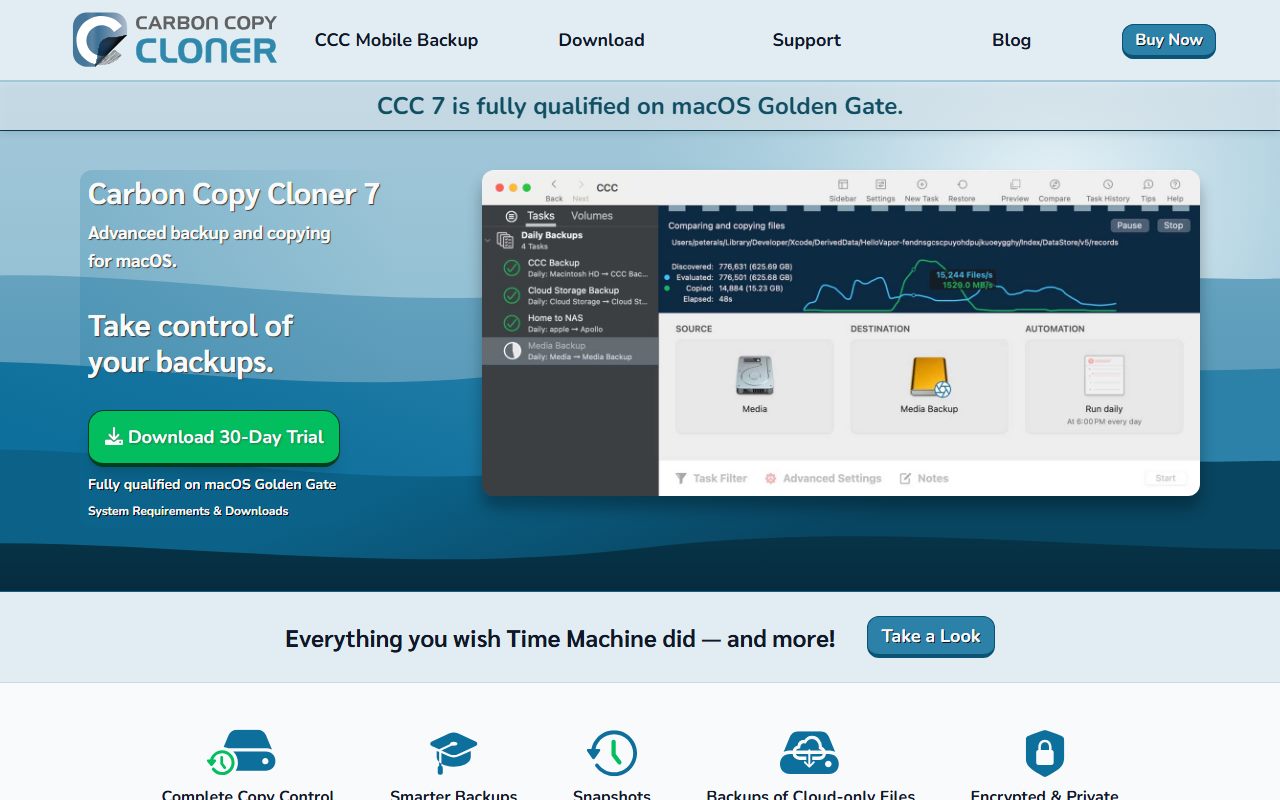
The widest licence, the deepest documented feature set, and the most honest set of unflattering clauses. Bombich asks $49.99 USD plus any applicable local taxes, once, per the pricing article checked October 15, 2026.
That licence covers 'any computer that you own or control for personal, noncommercial use', and a version 7 key is also accepted by CCC 5 and CCC 6. A house with an old Mac in it is still covered.
The trial is the best in the category: 30 days with the complete feature set and, in Bombich's words, 'No features are disabled during the trial.'
The two clauses that cost it points are both published. Major versions are paid upgrades. Refunds are case by case with a possible minimum 15% processing fee inside 30 days.
Read our full Carbon Copy Cloner 7 review for the corporate and technician price tables, the upgrade ladder, and the two places where Bombich's own pages quote different discount figures.
Deciding between the top two? Read Carbon Copy Cloner vs SuperDuper, which sets the licences and published terms side by side in a fifteen-row table.
Best free starting point: SuperDuper 4
The only product here whose free mode does the central job. Shirt Pocket's FAQ states that 'full Erase, then copy backups are available for free, including support.'
A licence buys automation rather than capability: scheduling, Smart Update and unattended copies, plus unlimited scheduled copies and use on all your personal Macs. The panel labels it 'not a subscription'.
The price is the part we cannot state cleanly. The store panel's own base price attribute reads $43.95, while the figure rendered to our machine was 1,288,733 Vietnamese dong, because Paddle localises by location.
The gap in the paperwork is the refund policy. We read the product page, store panel, FAQ and Classic page on October 15, 2026 and found no refund window, returns clause or money-back statement anywhere.
One more thing recommends it to anyone with an ageing machine. The FAQ says SuperDuper Classic 'supports macOS all the way back to Jaguar (10.2)', though Classic is a separate purchase rather than part of the version 4 licence.
Read our full SuperDuper 4 review for the exact free-tier wording, the date-sliding upgrade discount, and why we will not print a single confident dollar figure for the licence.
Best update promise: ChronoSync
The only vendor here that says it will never charge again. Econ Technologies writes that 'All updates are free for registered users' and that it has 'never charged for an update' in over 20 years.
It is also the narrowest grant. Both the product page and the store policy state that a key 'can be licensed on one Mac only', so a two-Mac household needs the $79.99 2-Pack.
The refund wording is the plainest of the three: 'Satisfaction Guaranteed. If you are not satisfied, we will gladly refund your money for up to 30 days after your purchase.' No processing fee is mentioned.
Two oddities keep it out of first place. The packs do not match their own per-unit labels, and the vendor brands a one-time purchase a 'Lifetime subscription', which its own sales FAQ concedes is 'just a terminology change'.
It is also the only one of the three that documents bi-directional sync as a first-class job alongside backups, which matters if your real problem is keeping two folders in step rather than duplicating a disk.
Read our full ChronoSync review for all four pack prices, the per-unit labels that do not reconcile with them, and the companion products that sit around it.
What a pay-once backup licence actually buys
It helps to be precise about what the money is for, because in this category it is rarely the ability to copy files. All three apps will duplicate a drive.
What a licence buys is automation. Scheduling, change detection, and copies that run while you are asleep. SuperDuper makes this explicit by charging for exactly that and nothing else.
The second thing it buys is safety rails. Carbon Copy Cloner's three verification levels and automated Backup Health Check exist because a backup you have not verified is a hope, not a copy.
The third is continuity. Econ Technologies' free-updates-for-life promise and Bombich's optional maintenance subscription are both answers to the same worry: that the thing you bought stops working on the next macOS.
What none of them sells is storage. Every price on this page is for software only. The drive is yours to buy, and the vendors assume you will use more than one.
The clauses that decide the real price
Four lines of small print move the total cost more than the sticker does. They are worth checking in this order.
The machine count. 'Household', 'all your personal Macs' and 'one Mac only' are three very different grants at the same $49.99. Read the exact noun the vendor used.
The upgrade clause. Bombich states that version jumps 'will be handled like most commercial software: current users will be offered an upgrade price'. That is a future bill with no date on it.
The refund mechanics. Two vendors publish 30 days. One attaches a possible minimum 15% processing fee and case-by-case review; the other writes 'Satisfaction Guaranteed' with no conditions. The third publishes nothing we could find.
The currency. A localised checkout can show a figure in a currency you did not expect, with tax folded in. Shirt Pocket says so outright: 'Prices outside the US are estimates.'
That last one is not a small print problem so much as a reading problem, and it is the subject of how to read a software deal before you pay.
How to choose between them
Count your Macs first. One Mac makes ChronoSync competitive and its one-key rule irrelevant. Two or more Macs swings it hard to Carbon Copy Cloner or SuperDuper, both of which cover a household on one payment.
Then decide whether you will click a button. If you will reliably run a backup by hand, SuperDuper is free. If you will not, scheduling is the thing you are actually buying, and every vendor here charges for it.
Then look ten years out. Two of these three say major versions are paid. Over a decade a free-updates-for-life promise can be worth more than the entire sticker price, which is the arithmetic in how lifetime software deals actually work.
Then read the refund clause, not the trial badge. A 30-day trial and a 30-day refund are not the same protection, and one vendor here attaches a fee to the latter.
Finally, check whether your use is commercial. All three household or personal licences exclude business use. Only Bombich publishes a corporate price list, from $49.99 per unit down to $30.00 at 25 or more.
Also compared, and why they did not make the cut
Arq 7 is a genuine pay-once app at $59.99 per computer using your own cloud storage, read on arqbackup.com on October 15, 2026.
It is excluded because the vendor's own pitch pushes buyers toward Arq Premium, a subscription at $69.99 a year for five computers with 1 TB included, plus $0.00699 per GB per month beyond that.
ChronoSync Express is listed at $9.99 on the Econ Technologies store index and would be the cheapest entry here.
It is excluded as a separate pick because it is a reduced version of the full app, sold through the Mac App Store under Apple's terms and also bundled into the Setapp subscription.
ChronoAgent at $19.99 is not a backup app. Econ's store policy says it 'is only needed if you are connecting two Macs', so it is an add-on rather than a competitor.
Time Machine is free with macOS and belongs in every setup, but it is not a purchase and cannot be ranked on licence terms. Shirt Pocket's own backup guidance argues for running a clone alongside it rather than instead of it.
CCC Mobile Backup is listed on Bombich's product page with a different charging model entirely: 'Transfer 100 files free. $2.99 in-app fee per destination type for unlimited backups.' That is an in-app purchase, not a perpetual licence.
TablePlus. A pay-once developer tool rather than a backup app, but the same licence question decides it: what one payment covers and whether the next version is free.
Affinity by Canva. Included for contrast on value, since it is the clearest example in our catalogue of a one-time purchase whose terms do not hide a paid upgrade clock.
Sublime Text. The other pay-once licence we grade highly on value, for the same reason: the cost of ownership is close to the sticker price.
What none of these vendors will tell you
What the next version costs. All three ship major versions. Two say those are paid and none publishes a figure or a date for the next one. Budget for it or pick the vendor that promises free updates.
What buyers actually think. None of the three full apps is sold through the Mac App Store, so there is no aggregated star rating to cite. Vendor-published testimonials are not a substitute, and we are not treating them as one.
How fast they copy. Bombich advertises a default 'beast mode'; Shirt Pocket advertises Turbo Smart Update as 'extremely fast'. Both are vendor claims. We did not measure throughput and will not estimate it.
How long ChronoSync's trial runs. We read the overview page, the licensing page's trial section and the sales FAQ on October 15, 2026, and tried two dedicated trial URLs that returned the site's own 404. The length is not published on any page we found.
Bottom line
Install SuperDuper 4 free this week and make one bootable copy by hand. That costs nothing, is supported, and does not expire.
If you forget to run it twice, buy the scheduler. Carbon Copy Cloner 7 at $49.99 if you have more than one Mac or want snapshots and verification; ChronoSync at $49.99 if you have exactly one Mac and want never to pay again.
Whichever you choose, read the currency symbol before the digits at checkout, and ask about refunds if the vendor has not published them.
For the licence mechanics behind all of this, read what happens after you pay once and how to read a software deal before you pay. For the same question applied to the rest of the category, see the best pay-once software for freelancers.
Best overall pay-once Mac backup app: Carbon Copy Cloner 7
Bombich asks $49.99 USD plus any applicable local taxes, once, and the licence covers every Mac you own or control for personal non-commercial use. A version 7 key is also accepted by CCC 5 and CCC 6, which keeps an older machine in scope. The trial is 30 days with the complete feature set and nothing disabled. The documented feature list is the longest here: snapshot retention controls, filter rules with a visual preview, three levels of verification, and temporary downloads of cloud-only files from iCloud, Google Drive, Dropbox, OneDrive and Box. All figures read October 15, 2026.
It sits at number one because it covers the most Macs for one payment and documents the most. It is not the cheapest, and Bombich says plainly that major upgrades are paid.
Visit Carbon Copy Cloner 7
We have no affiliate relationship with this vendor. Link goes to the official site.
Best free starting point: SuperDuper 4
The unregistered mode is not a demo. Shirt Pocket's FAQ says 'full Erase, then copy backups are available for free, including support', so a manual bootable backup costs nothing and never expires. A licence unlocks scheduling, Smart Update and unattended copies, covers all your personal Macs, and is labelled 'not a subscription'. The store panel's own base price attribute reads $43.95, but the rendered figure was localised to Vietnamese dong for our reading machine, and the panel warns that prices outside the United States are estimates. Version 4 requires macOS 14 Sonoma or later. All figures read October 15, 2026.
It sits at number two rather than number one because of what is missing from the paperwork, not the software. There is no published refund window and no printed US dollar price on the rendered page.
Visit SuperDuper 4
We have no affiliate relationship with this vendor. Link goes to the official site.
Best update promise, for a single Mac: ChronoSync
Econ Technologies writes that 'All updates are free for registered users' and that it has never charged for an update in more than 20 years, which is the strongest lifetime-cost promise in this group. It also states twice that a key 'can be licensed on one Mac only', so the household maths falls apart quickly. Single $49.99, 2-Pack $79.99, 5-Pack $174.99, 25-Pack $749.75. The refund wording is the clearest of the three: Satisfaction Guaranteed for up to 30 days, with no fee mentioned. Bi-directional sync is documented alongside bootable backups. All figures read October 15, 2026.
It sits at number three on licence spread alone. On a ten-year horizon with one Mac it may well be the cheapest choice here, which is why it wins its own award rather than the overall one.
Visit ChronoSync
We have no affiliate relationship with this vendor. Link goes to the official site.
How we chose
We read each vendor's pricing page, store panel, refund or sales policy, licensing terms, trial documentation and feature list, then recorded every figure with the date we read it. We did not run tests of our own; grades come from documentation, pricing pages and vendors' published terms checked on October 15, 2026. Where a vendor's own pages disagreed with each other, both wordings are printed rather than the more convenient one. Where a figure could not be read after trying both a normal fetch and a full browser render, we say so instead of guessing. Four criteria carried the most weight: what one payment actually covers, whether major upgrades are paid, what the refund window says, and how much of the feature list the vendor is willing to document.
Frequently asked
What is the best pay-once Mac backup app?
Carbon Copy Cloner 7 on our rubric, at $49.99 USD plus local taxes for every Mac in a household, with a 30-day full-feature trial. SuperDuper 4 is the better first move because its erase-then-copy mode is free, and ChronoSync is better for a single Mac kept for years.
Is there a genuinely free Mac backup app besides Time Machine?
Yes. SuperDuper 4's unregistered mode performs full erase-then-copy backups free, with support included, per the vendor's FAQ checked October 15, 2026. What it does not do free is schedule those backups or run Smart Update.
Do any of these include free updates forever?
One does. Econ Technologies says 'All updates are free for registered users' for ChronoSync and that it has never charged for an update in over 20 years. Bombich and Shirt Pocket both state that major version jumps are paid purchases.
Which one covers more than one Mac for a single payment?
Carbon Copy Cloner and SuperDuper both do. CCC covers any computer you own or control for personal non-commercial use; SuperDuper covers all your personal Macs. ChronoSync is one Mac per key, with a 2-Pack listed at $79.99.
Can I use these licences for client work?
Not the consumer ones. All three are personal or household licences. Bombich publishes the commercial route: corporate seats from $49.99 per unit down to $30.00 at 25 or more, plus a Pro technician licence from $125.00, read October 15, 2026.
How much does Carbon Copy Cloner cost compared with SuperDuper?
CCC is $49.99 USD plus applicable local taxes. SuperDuper's store panel carries a base price attribute of $43.95, roughly six dollars less, though the figure rendered to our reading machine was in Vietnamese dong because the checkout localises by location.
Should I still run Time Machine as well?
Shirt Pocket's own backup guidance argues yes, on the grounds that two copies made by the same mechanism share the same failure modes. Give each tool its own destination volume rather than pointing both at one drive.
Do any of these have a public user rating?
Not that we could cite. None of the three full apps is sold through the Mac App Store, so there is no aggregated buyer score. Vendor-published testimonials exist on at least one product page and we are not treating those as verified user reports.